
The Alert That Told Me Nothing (And That’s Exactly Why I Kept Digging)
The Setup
This lab was a fun one because the alert itself barely tells you anything. An Event Log Cleared rule fired on an Exchange server. That’s it. Here’s what showed up in the SIEM:
Before I even touched a log, a few things were already bugging me. It’s an Exchange server, so it’s sitting right on the edge of the network handling mail for everybody. The rule that fired exists for one reason: catching someone trying to erase their tracks. And the process behind it is powershell.exe, which is about as normal as it gets on a Windows box and also, let’s be real, the tool every attacker reaches for these days. None of that screams “compromised” by itself, but it was enough to make me slow down instead of clicking through it.
Quick Refresher: What ‘Log Cleared’ Actually Looks Like
Before I went hunting through logs, I wanted to know exactly what I was hunting for. There are three Windows event IDs worth knowing here:
- 1102 – someone cleared the Security log
- 1100 – the logging service itself got shut off
- 104 – logs cleared, but this shows up in the System log instead. Worth knowing because attackers sometimes wipe one and completely forget the other
Having that in your back pocket saves you time. If Security’s empty but System shows a 104, that’s basically the attacker telling on themselves.
The Logs Gave Me Nothing (Which Is Actually Something)
First move was pulling up the SIEM and filtering right around the alert’s timestamp. And, well, nothing came back. Empty. Not a single entry.
At first that feels like a dead end, but it’s really not. If the alert is called Event Log Cleared and then the logs are empty exactly where you’d expect to see the clearing event… yeah, that’s the alert basically confirming itself. No logs doesn’t mean no activity. If anything it made me more suspicious, not less.
The Endpoint Told a Completely Different Story
Since the logs weren’t giving me anything, I switched over to the Endpoint Security dashboard for the Exchange host (172.16.20.3) and started poking around processes, terminal history, and browser history.
The powershell.exe from the alert was right there, and the hash matched what the alert reported. So no, this wasn’t some phantom entry, it was genuinely running on that machine.
But the terminal history is where things got interesting. The commands in there weren’t from the day of the alert at all, they went all the way back to October of the previous year. Months earlier. And they showed someone enumerating users, spinning up a brand new local account called backupUser, and then quietly adding it to a group called backupGroup.
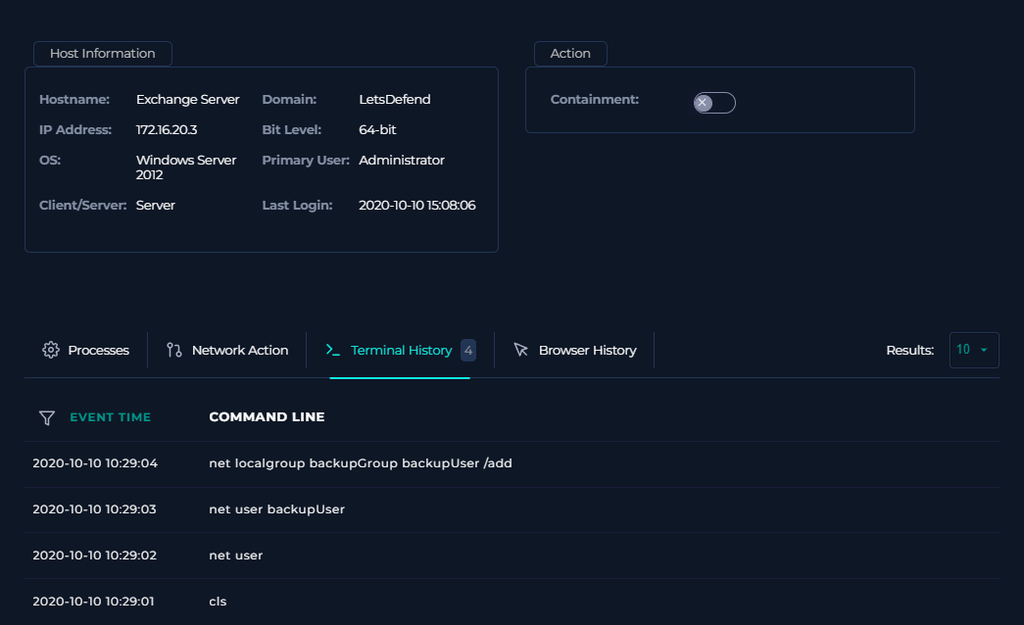
Creating an account and folding it into a group with zero ticket, zero change record, zero paper trail anywhere, that’s a classic persistence move. It’s how attackers keep a spare key around even after you patch whatever door they originally walked through. And the fact that this happened four months before the alert even fired is the part that really got me. Whoever did this may have had a foothold on this Exchange server for a long time before anyone noticed.
VirusTotal Said Clean. I Didn’t Buy It.
Next up, I ran the file hash through VirusTotal. Zero vendors flagged it.
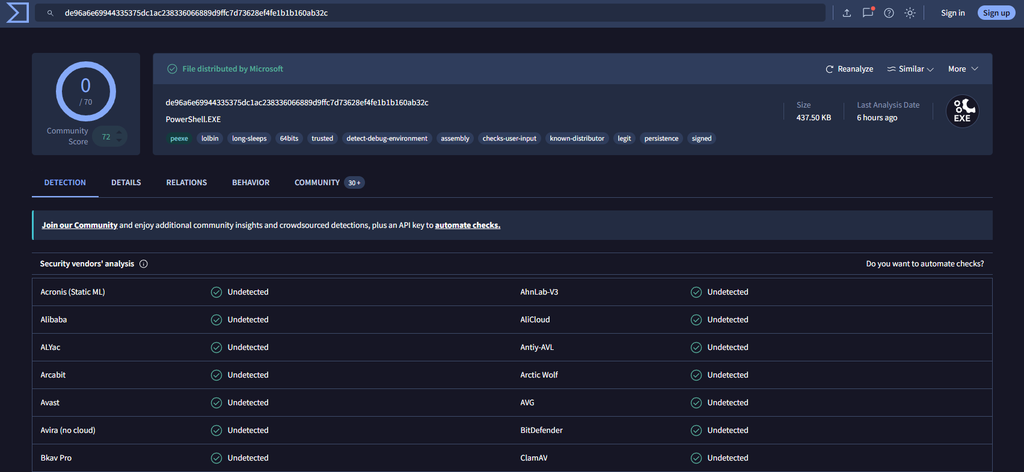
This is the part where I want to grab newer analysts by the shoulders for a second. A clean VirusTotal result just means antivirus vendors haven’t catalogued it as malicious yet, nothing more than that. It’s not a verdict, it’s a snapshot. That matters even more with something like powershell.exe, since it’s a totally legit Windows binary. Nobody’s flagging the tool itself, the danger is entirely in what someone tells it to do.
So I kept going. The Community tab on VirusTotal pointed to a Joe Sandbox report on the same hash, and that’s where things clicked. Joe Sandbox called out initial access through the PowerShell executable, conhost.exe spawning to handle console stuff, some evasion tricks (location checks, a sketchy file path), and, this is the big one, the binary was actively enumerating both the System and Security event logs. That lines up perfectly with an alert literally named Event Log Cleared.
Any.run Sealed It
I wanted to actually watch this thing run instead of just reading a sandbox summary, so I ran the sample through Any.run for dynamic analysis. Overall verdict came back as malicious activity, but the details told a slightly different story than I was expecting going in.
First thing that jumped out: the file wasn’t running from where PowerShell normally lives. Any.run tracked three separate copies during this run, staged as powershell.exe in both the Desktop and Downloads folders, not System32. The copy on the Desktop (PID 5820) is the one Any.run flagged outright as starting a Microsoft application from an unusual location. That’s not PowerShell. That’s something wearing PowerShell’s name, sitting in more than one place a user would actually look, and hoping nobody checks the path. Classic masquerading.
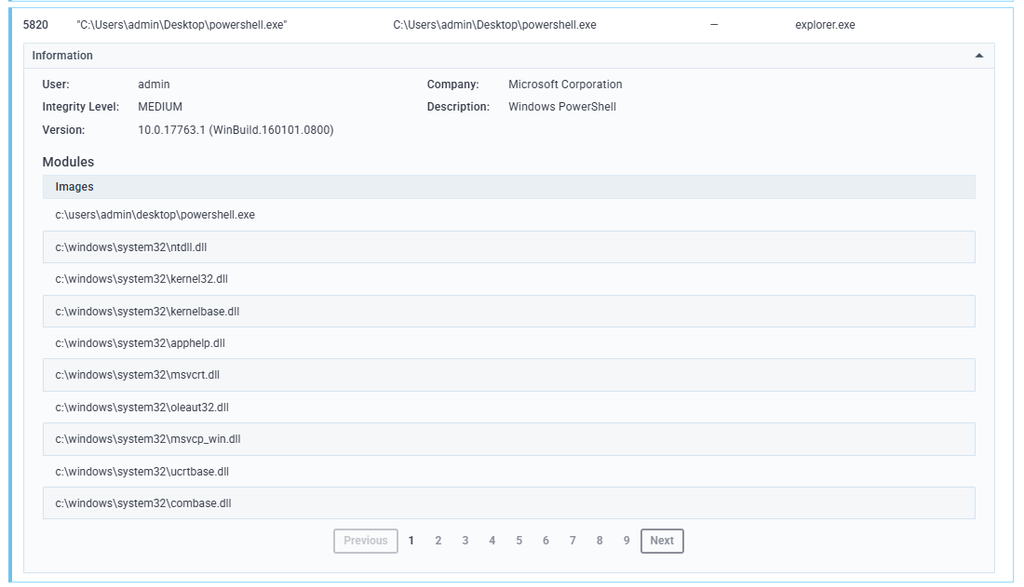
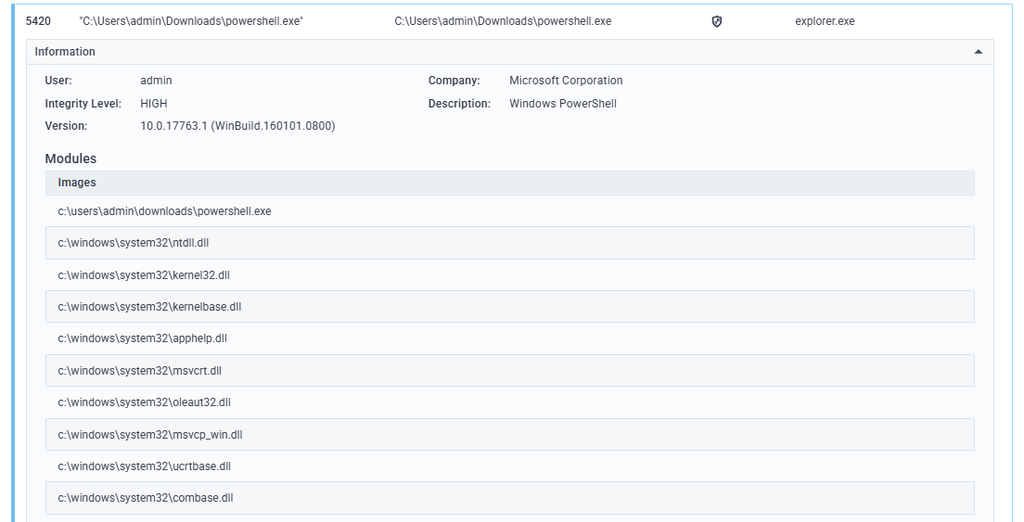
From there, the process did a lot of quiet homework: checking its own PowerShell version and command history, reading the Windows install date, pulling the machine GUID, and checking Internet Explorer’s security zone settings. None of that is loud or destructive on its own, it’s the kind of environment fingerprinting a payload does to figure out if it’s sitting in a sandbox before it decides whether to show its real behavior.
I went looking for the outbound C2 connections the original writeup for this lab described, and honestly, I couldn’t back that part up. The connections I could see in the report were all tied to msedge.exe and normal Windows services, nothing under a powershell.exe process ID. So I’m not going to claim confirmed command-and-control traffic here when the data in front of me doesn’t support it.
What I could confirm, and what’s honestly the stronger find anyway, is that Any.run’s own threat detection flagged the download itself: a network trojan alert reading Suspected Amazon CDN Associated with Malware Distribution, pointing straight at the S3 bucket the zip file came from.
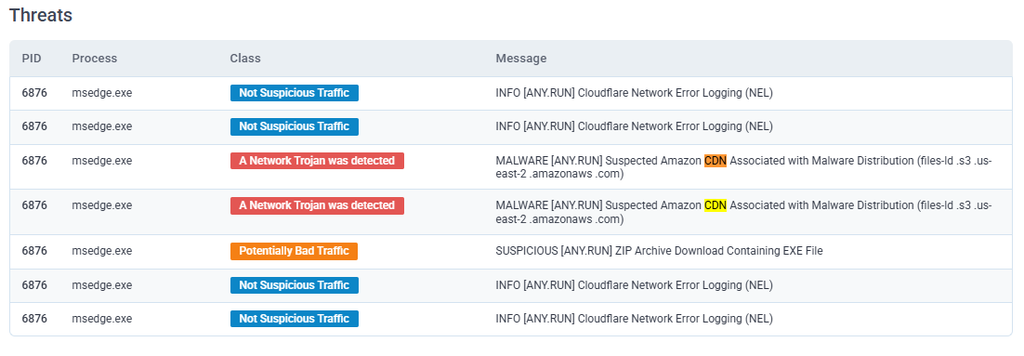
So instead of “PowerShell phoned home to five IPs,” the real story is: a file masquerading as PowerShell, launched from a user’s Downloads folder, fingerprinting the machine it landed on, delivered from infrastructure Any.run already associates with malware distribution. That’s plenty on its own.
Time to Pull the Plug
Cleared logs, a sandbox verdict of malicious, a backdoor account built months in advance, and live outbound traffic during execution. That’s more than enough to justify isolating the box, so I contained the Exchange server.
I know, taking an Exchange server offline is a headache. Email stops, people notice within about five minutes, and your inbox fills up with “is mail down??” messages. But leaving a possibly compromised, internet-facing server phoning home is a much worse Tuesday than an hour of email outage.
Where I Went Off-Script From the Playbook
LetsDefend’s built-in playbook marked two of my calls wrong: it said this wasn’t actually a true positive, and that the malware wasn’t malicious. I’m going to push back on that one a little.
Sure, VirusTotal came back clean. But by the time I wrapped this up I had a sandbox report explicitly calling the behavior malicious, a masquerading PowerShell payload launched from a user’s Downloads folder, delivery infrastructure Any.run already flags for malware distribution, endpoint history showing a persistence mechanism someone built months ahead of time, and logs that went suspiciously silent exactly where they shouldn’t have. Closing that out as a false positive because one antivirus aggregator said clean is exactly the kind of shortcut that lets real incidents slip through.
I’m sticking with my read: true positive, malicious. Tools and analysts disagree sometimes, and when that happens, the move isn’t to just shrug and go with the automated score. It’s to write down why you disagree and hand it off for a second opinion.
The Takeaway
An empty log where you expected to find one is not the end of the investigation, it’s the start of it. And a clean scan from one vendor is a data point, not a finish line. Stack up enough small signals, quiet logs, a sketchy new account, a payload wearing the wrong name in the wrong folder, delivery infrastructure with a bad reputation, and the story tells itself way more clearly than any single tool ever will on its own.