
This post contains affiliate links. If you purchase through them, I may earn a commission at no extra cost to you. I only recommend tools I’d use myself.
Let’s be honest, most VPN comparisons are written by people whose biggest security challenge is deciding which Netflix library to use.
If you’re an IT professional, cloud engineer, or sysadmin, you need something different. You need a VPN that won’t bottleneck your SSH sessions, won’t leak DNS when you’re jumping between cloud environments, and won’t embarrass you in front of a client because it dropped the connection mid-remote session.
So let’s cut through the noise. I’ve spent years working in Linux-based cloud environments; handling DDoS mitigation, incident response, and securing infrastructure for hundreds of customers. Here’s how NordVPN and Surfshark actually stack up when your job depends on staying connected and staying secure.
Why IT Professionals Need a VPN (That Isn’t Just Marketing Speak)
Most people use a VPN for streaming. That’s fine. But IT professionals have very different use cases:
- Securing remote access to cloud infrastructure (AWS, Azure, Linode) over public or semi-trusted networks
- Encrypting traffic between devices on a distributed team
- Accessing internal tools, admin panels, or restricted cloud consoles while traveling
- Protecting sensitive data during client site visits or conference Wi-Fi
- Testing geo-restricted APIs or CDN behavior from different regions
For these use cases, you care a lot less about unblocking streaming services and a lot more about stability, encryption strength, kill switch reliability, and whether the VPN provider has ever had a breach.
With that framing, let’s get into it.
Quick Comparison: NordVPN vs Surfshark at a Glance
| Feature | NordVPN | Surfshark | Winner |
|---|---|---|---|
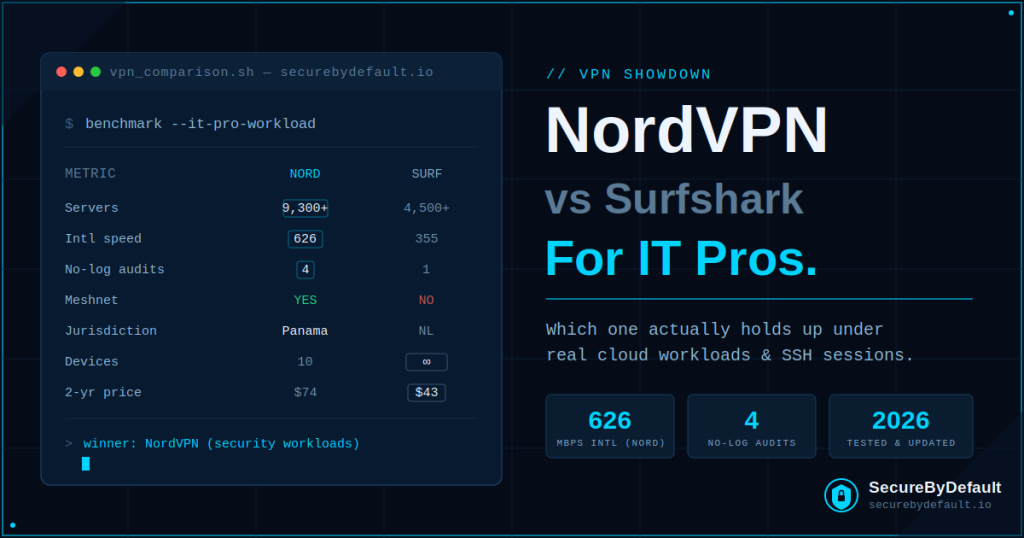
| Servers | 9,300+ in 137 countries | 4,500+ in 100 countries | NordVPN |
| Pricing (2-yr plan) | ~$3.09/month | ~$1.78/month | Surfshark |
| Simultaneous Devices | Up to 10 | Unlimited | Surfshark |
| Encryption | AES-256 + NordLynx | AES-256 + WireGuard | Tie |
| Kill Switch | Yes | Yes | Tie |
| Multi-hop / Double VPN | Pre-configured Double VPN | Custom Dynamic MultiHop | Surfshark (flexibility) |
| Dedicated IP | Yes (24 countries) | Yes (11 countries) | NordVPN |
| Meshnet (P2P) | Yes | No | NordVPN |
| Jurisdiction | Panama (14-Eyes free) | Netherlands (9-Eyes) | NordVPN |
| Independent Audits | 4x (PwC, Deloitte, VerSprite) | 1x (Deloitte 2025) | NordVPN |
| Threat Protection / AV | Yes (92% block rate, AV-Comp cert.) | Yes (CleanWeb) | NordVPN |
| Trans-Atlantic Speed | ~626 Mbps | ~355 Mbps | NordVPN |
| No-Logs Policy | Audited & verified | Audited (RAM-only servers) | Tie |
| Money-Back Guarantee | 30 days | 30 days | Tie |
Security & Encryption: Both Strong, But NordVPN Goes Deeper
Both VPNs use AES-256 encryption, which is the same standard used by governments and financial institutions. Neither will leave you exposed at the protocol level. But when you dig into the details, NordVPN pulls ahead for security-conscious professionals.
NordVPN’s Security Edge
NordVPN runs its own NordLynx protocol; a WireGuard implementation that combines WireGuard’s speed with a double NAT system that prevents user tracking. They’ve also rolled out NordWhisper, a new obfuscation protocol for high-censorship environments.
More importantly for IT pros: NordVPN has completed four independent no-logs audits by PwC and Deloitte, plus an infrastructure audit by VerSprite. In January 2026, NordVPN’s Threat Protection Pro scored a 92% phishing block rate with zero false positives in AV-Comparatives testing; the first VPN-bundled security tool to be benchmarked against standalone antivirus products.
That’s not marketing. That’s third-party verification. And in security, third-party verification is everything.
Check current NordVPN pricing →Surfshark’s Security Strengths
Surfshark isn’t weak here, it just has fewer audits under its belt. All servers are RAM-only, meaning every reboot wipes the server completely. There’s no persistent data for anyone to subpoena, even if they tried. Their Deloitte audit in June 2025 certified this policy under the ISAE 3000 Reasonable Assurance standard.
Surfshark also offers Dynamic MultiHop, which lets you manually configure which two servers your traffic hops through, which gives you more flexibility than NordVPN’s pre-configured Double VPN routes. If you want to get creative with your routing, Surfshark gives you more control there.
💡 For IT professionals: NordVPN’s audit history and Threat Protection Pro certification make it the stronger choice if you’re in a regulated environment or working with sensitive client data. For most cloud work, both are more than adequate.
Speed & Performance: The Numbers That Actually Matter
Speed comparisons in VPN reviews are usually pretty useless because they test from home connections that nobody uses professionally. Let’s talk about what matters for IT work.
Long-Distance Connections (Where It Matters Most)
For trans-Atlantic connections, think managing EU cloud resources from the US, or the other way around, NordVPN consistently outperforms Surfshark. Independent 2026 tests clocked NordVPN at around 626 Mbps on trans-Atlantic routes versus Surfshark’s 355 Mbps.
For an SSH session or a web console? That gap doesn’t matter. For transferring large VM snapshots or pulling data from a remote database? It absolutely does.
Local Speeds
Interestingly, Surfshark edges out NordVPN on local speeds, hitting peaks around 1,615 Mbps versus NordVPN’s 1,249 Mbps in the same test cycle. If you’re primarily using a VPN within your own country or region, Surfshark won’t slow you down.
Server Count
NordVPN runs 9,300+ servers across 137 countries. Surfshark has 4,500+ across 100 countries. For IT professionals who need to connect to specific regions for testing, compliance, or client work, NordVPN’s larger footprint gives you more options; and more servers means less congestion per server.
The Features That Actually Matter for IT Work
Meshnet (NordVPN Only)
This is NordVPN’s most underrated feature for IT professionals. Meshnet lets you create encrypted direct connections between devices; essentially a private, encrypted overlay network. You can use it to:
- Access your home lab remotely without port forwarding
- Create secure LAN-like connections between distributed team members
- Route traffic through a trusted device rather than a VPN server
Surfshark has no equivalent. If you’ve ever wrestled with setting up WireGuard on your own infrastructure, Meshnet is basically that, but without the setup headache.
Kill Switch
Both VPNs have a kill switch. Both work reliably. This is table stakes at this point — if a VPN you’re considering doesn’t have a kill switch, stop considering it.
Split Tunneling
Both offer split tunneling, letting you route some traffic through the VPN while keeping other traffic on your regular connection. Useful for keeping your banking app on your home IP while routing cloud console traffic through the VPN.
Dedicated IP
NordVPN offers dedicated IPs in 24 countries. Surfshark covers 11. If you need a static IP for whitelisting in a firewall rule or accessing a client’s restricted environment, NordVPN’s wider coverage matters.
Unlimited Devices (Surfshark)
Surfshark allows unlimited simultaneous device connections. NordVPN caps you at 10. For most individual IT professionals, 10 is plenty. For a small team sharing a subscription, Surfshark’s unlimited policy is genuinely useful.
Privacy & Jurisdiction: A Real Consideration for Security Professionals
NordVPN is headquartered in Panama; outside the Five Eyes, Nine Eyes, and Fourteen Eyes surveillance alliances. That means no government data-sharing agreements that could compel them to hand over user data.
Surfshark operates from the Netherlands, which is a Nine Eyes member. In practice, their RAM-only server architecture means there’s nothing to hand over even if they were compelled. But if your clients or company policies require VPN providers outside intelligence-sharing alliances, NordVPN is the cleaner answer.
⚠️ Note: Both NordVPN and Surfshark are now owned by the same parent company (Nord Security), but they operate entirely independent infrastructure, audits, and feature roadmaps. They’re not the same product — think of them like two separate insurance companies that happen to be owned by the same holding group.
Pricing: What You’re Actually Paying
On two-year plans, the only pricing worth comparing, since monthly rates are 4x higher and make no sense for regular use:
- NordVPN Basic: ~$3.09/month ($74 total over 2 years)
- Surfshark Starter: ~$1.78/month ($43 total over 2 years)
Surfshark saves you about $30 over two years. That’s roughly the cost of one good technical book. Not nothing, but also not the deciding factor if you’re choosing a professional security tool.
Both offer a 30-day money-back guarantee. Both have higher tiers that bundle antivirus tools and data breach monitoring if you want a broader security stack.
The Verdict: Which One Should IT Professionals Use?
Choose NordVPN if you:
- Work in regulated industries or handle sensitive client data
- Need consistent performance on international connections
- Want Meshnet for secure device-to-device connections or remote lab access
- Need dedicated IP for firewall whitelisting across multiple regions
- Prefer the most independently audited VPN on the market
- Work in environments where Panama jurisdiction matters for compliance
Choose Surfshark if you:
- Manage VPN access for an entire small team (unlimited devices)
- Work primarily within your country or region where local speeds dominate
- Want maximum flexibility with custom MultiHop routing
- Are budget-conscious and happy with one fewer audit on the books
- Want Alternative ID (generates a fake email to protect your real address from data leaks)
🏆 My Pick: For individual IT professionals and cloud engineers, NordVPN is the stronger recommendation. The audit depth, Meshnet feature, wider dedicated IP coverage, and superior long-distance performance make it worth the small price premium. If you’re managing a team or need unlimited devices, Surfshark closes the gap significantly.
Final Thoughts
VPN marketing loves to make these products sound identical. They’re not. When you’re securing remote access to cloud infrastructure, the difference between a pre-configured Double VPN and a fully audited no-logs policy can mean the difference between a smooth client engagement and an uncomfortable conversation with your CISO.
Both NordVPN and Surfshark are legitimate, professional-grade tools. Neither will embarrass you. But for IT work that demands a little more from your security stack, NordVPN earns the top spot. For teams or budget-focused workflows, Surfshark is an excellent second choice.
Either way, start on a two-year plan, use the 30-day money-back guarantee to actually test it in your real workflow, and stop using your ISP’s connection for remote cloud work without one.
🔗 Ready to try one? Both come with a 30-day money-back guarantee, zero risk.
- Get NordVPN → (affiliate link)
- Get Surfshark at surfshark.com
Disclosure: This post contains affiliate links. If you purchase through these links, I may earn a commission at no extra cost to you. I only recommend tools I’d trust with my own infrastructure.
📋 Key Takeaways
- Both VPNs use AES-256 encryption and have audited no-logs policies; neither will expose you at the protocol level
- NordVPN wins on: server count, international speed, audit history, Meshnet, dedicated IP coverage, and jurisdiction
- Surfshark wins on: price, unlimited simultaneous devices, dynamic MultiHop flexibility, and local peak speeds
- NordVPN is the stronger choice for regulated environments and security-sensitive IT work
- Surfshark is the stronger choice for teams, budget-conscious buyers, and flexible multi-hop routing
- Both offer 30-day money-back guarantees. Test the one that fits your workflow before committing
Get the security checklist most
businesses skip.
A free 25-point audit covering the exact gaps attackers hit first — engineer-built, no jargon. Plus one practical security breakdown every Tuesday. No fluff, no fear-mongering.
Get the Free Checklist →Free on signup · Unsubscribe anytime · ~1 email per week