
This post contains affiliate links. If you purchase through them, I may earn a commission at no extra cost to you. I only recommend tools I’d use myself.
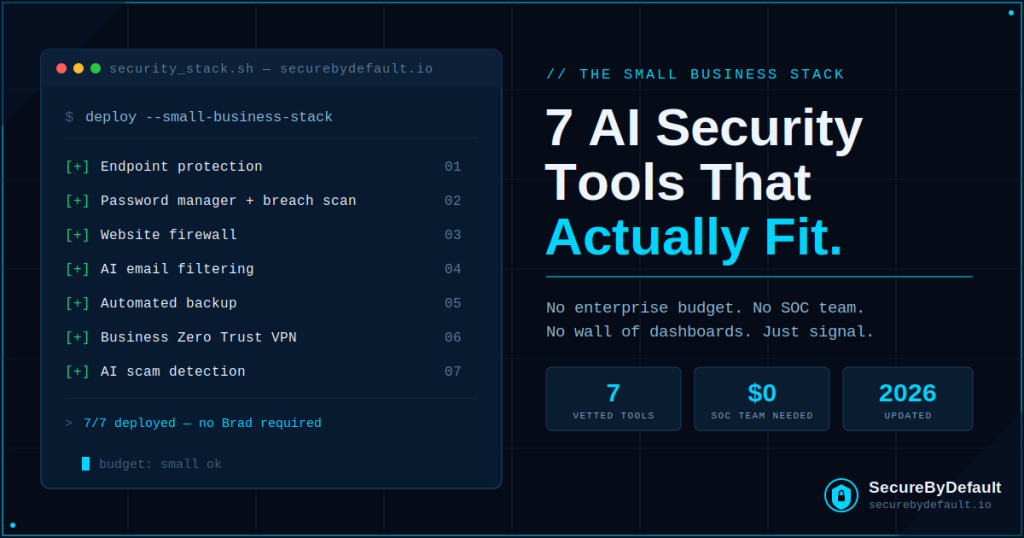
Let’s start with an uncomfortable truth: most “best AI cybersecurity tools” articles are written for companies with a security operations center, a seven-figure budget, and a guy named Brad whose entire job is staring at a wall of dashboards.
That is not you. You run a small business. Your “security team” is you, possibly your cousin who is “good with computers,” and a firewall you configured once in 2022 and have been quietly hoping never needs attention again.
Here’s the thing nobody tells small businesses: attackers love you. Not in a flattering way. They love you because you have real money and data, but rarely the defenses of a large enterprise. You’re the unlocked car in a parking lot full of ones with alarms. And in 2026, the people checking door handles aren’t people anymore; they’re bots, and increasingly, they’re AI.
The good news? The same AI arms race that’s making attacks scarier has also produced genuinely useful, genuinely affordable defensive tools. You don’t need Brad. You don’t need the wall of dashboards. You need a handful of tools that do the heavy lifting automatically so you can get back to running your actual business.
I’ve spent years working in cloud security and incident response, doing the unglamorous work of keeping infrastructure alive while things are actively on fire. These are the AI-powered tools I’d actually recommend to a small business owner who asked me at a barbecue, with no marketing department whispering in my ear.
First, What Does “AI-Powered” Even Mean Here? (A 30-Second Explanation)
Every security vendor on earth slapped “AI-powered” on their box in the last two years. Most of it is marketing. Some of it is real and genuinely matters.
The real version works like this: traditional security tools work off a list of known bad things. If a threat isn’t on the list, it walks right in. AI-powered tools instead learn what “normal” looks like for your systems and flag anything weird, even brand-new attacks nobody has a name for yet. Think of it as the difference between a bouncer with a list of banned faces versus a bouncer who notices the guy trying every door handle at 3 a.m. regardless of what he looks like.
That second bouncer is what you want. Here are seven of them.
1. Bitdefender GravityZone – The “Set It and Mostly Forget It” Endpoint Protection
If you only adopt one tool from this entire list, make it solid endpoint protection, and Bitdefender GravityZone is the one I’d point a small business toward first.
“Endpoint protection” is a fancy way of saying “the thing that protects every laptop, desktop, and server your business touches.” GravityZone uses machine learning and behavioral analysis to catch ransomware and zero-day threats by watching how files behave, not just matching them against a list of known viruses. It’s known in the industry for a low total cost of ownership and not turning your employees’ laptops into space heaters that take four minutes to open a spreadsheet; which, if you’ve used certain other antivirus products, you know is a real and underrated feature.
Why it fits a small business: centralized management means you can see every device from one dashboard without needing a dedicated person to babysit it. It scales down to small teams without making you feel like you accidentally bought enterprise software you’ll never grow into.
The honest caveat: like anything, it occasionally flags something harmless and makes you sweat for thirty seconds. That’s the cost of a tool that errs on the side of caution. I’ll take a slightly nervous Tuesday over a ransomware Thursday every time.
2. A Password Manager With Breach Monitoring – Because “Password123!” Is Not a Strategy
I know. A password manager isn’t sexy. Nobody has ever bragged at a dinner party about their excellent password hygiene. But the boring stuff is exactly what stops the majority of real-world breaches, and the data on this is brutal: reused and stolen credentials are the number one way attackers get in. Not Hollywood hacking. Not someone in a hoodie typing furiously. Just someone logging in with a password your employee also used on a website that got breached in 2019.
Modern password managers (NordPass, 1Password, and Bitwarden are the ones I’d actually trust) now bundle AI-driven dark web monitoring. They continuously scan breach databases and tell you the moment one of your business credentials shows up somewhere it shouldn’t; ideally before an attacker gets around to using it.
Why it fits a small business: this is the highest security return for the lowest effort and cost on the entire list. A few dollars per user per month removes an entire category of attack. If security were a video game, this is the part where you pick up the free armor lying on the ground at the start of the level and there is no reason not to.
The honest caveat: you have to actually get your team to use it. This is a people problem, not a technology problem, and it is genuinely the hardest part. The tool is easy. Convincing Greg in accounting to stop keeping passwords in a Notes file titled “passwords” is the real boss fight.
3. Sucuri – Website Protection for People Who Don’t Want to Become Website Security Experts
If your business has a website, that website is a target. WordPress sites in particular get probed constantly by automated bots looking for outdated plugins, weak logins, and the digital equivalent of an unlocked back door.
Sucuri is a cloud-based web application firewall and malware cleanup service that sits in front of your site and filters out the bad traffic before it ever reaches you. The AI/behavioral side continuously watches for attack patterns and blocks them, and if your site does get compromised, their cleanup service is the cavalry you call instead of spending a frantic weekend googling “how to remove malware from WordPress” while your site shows a fake pharmacy ad to your customers.
Why it fits a small business: it’s the tool that lets a non-technical owner sleep at night without learning what a web application firewall actually is. You point your site at it and it does the job.
The honest caveat: if you’re technically capable and run your own server, you can replicate a lot of this yourself with good server hardening. I have done this, on this very site. But for the overwhelming majority of small businesses, paying Sucuri to handle it is far cheaper than the time (and panic) of doing it yourself badly.
4. AI-Powered Email Filtering – Because Phishing Got a Glow-Up
Remember when you could spot a phishing email because it was riddled with typos and addressed you as “Dear Valued Costumer”? Those days are over. AI killed the typo tell. Modern phishing emails are written by the same kind of language models writing everyone’s marketing copy, which means they’re clean, professional, and frighteningly convincing. The fake invoice now has perfect grammar and your actual vendor’s logo.
This is where AI-powered email security earns its keep. Tools that layer on top of Google Workspace or Microsoft 365 (look at offerings from vendors like Barracuda, Abnormal Security, or the advanced tiers of what you may already be paying for) use behavioral analysis to catch the things humans now miss; like an email that looks exactly like your CEO’s but came from a domain registered nine minutes ago, or a payment-detail change request that breaks the pattern of how your vendor normally communicates.
Why it fits a small business: email is still the front door for the majority of attacks, and small businesses get hit with business email compromise hard because there’s often no process to catch a fraudulent “please wire the money to this new account” request. AI filtering is a safety net under your most exploited channel.
The honest caveat: no filter is perfect, and the best email security in the world is still backstopped by a simple human rule; verify any financial request out loud, on a phone call, every single time, no exceptions. The tool reduces the risk. The phone call eliminates the expensive version of it.
Want the 25-point security checklist I actually use? It’s the same baseline I run against real infrastructure — free, no fluff.
Get the Free Checklist →5. Automated, AI-Aware Backup (The Tool You’ll Be Most Grateful For and Think About Least)
Backup is the tool nobody thinks about until the exact moment they would trade a kidney to have it. Ransomware’s entire business model depends on you not having a working, recent, offline backup. Take that away and a ransomware attack goes from “existential crisis” to “annoying Tuesday.”
Modern backup solutions (Acronis Cyber Protect is the one that most explicitly fuses backup with AI-driven anti-ransomware; many others are solid too) now do more than copy files. They actively watch for the behavioral signature of ransomware encrypting your data and can stop it mid-attack, then roll you back to the last clean version like nothing happened.
Why it fits a small business: this is your “undo” button for the worst day of your business year. The 3-2-1 rule still rules; three copies, two types of media, one off-site or offline. Automate it so it doesn’t depend on anyone remembering, because someone will not remember.
The honest caveat: a backup you’ve never tested is not a backup, it’s a hope. Restore from it at least once a quarter so you find out it works on a calm Tuesday and not during the actual fire. I cannot stress this enough. The number of businesses that discover their backups were silently broken for eight months at the worst possible moment would make you weep.
6. A VPN Built for Business, Not Just Streaming
Your team works from coffee shops, home networks, airport lounges, and that one client’s guest Wi-Fi that has definitely never been patched. Every one of those is an opportunity for someone to intercept traffic or slip onto your systems.
A business-grade VPN with Zero Trust features (NordLayer is the natural pick if you want something that scales from a few people to a real team) encrypts that traffic and controls who can reach what. The “Zero Trust” part is the modern upgrade: instead of trusting anyone who’s “inside” the network, it verifies every connection every time, so a single compromised laptop doesn’t hand an attacker the keys to everything.
Why it fits a small business: remote and hybrid work isn’t going anywhere, and “we’ll just trust the home Wi-Fi” is not a security model. This closes a gap most small businesses don’t even realize is wide open.
The honest caveat: a consumer VPN (the kind advertised on every podcast for unblocking streaming libraries) is not the same thing as a business Zero Trust solution. They solve different problems. Don’t protect your company with a tool designed to help someone watch a different country’s Netflix catalog.
7. AI-Powered Scam and Threat Detection Bundles (The Sensible “Starter Pack”)
Sometimes the right answer for a very small business isn’t seven separate tools, it’s one well-rounded suite that covers the basics competently. Vendors like Norton Small Business have leaned into AI-powered scam detection that flags sophisticated phishing and social engineering, bundled with device security, VPN, and identity monitoring in one subscription.
Is a bundle as strong as best-in-class tools in every individual category? No. Will it dramatically improve the security of a five-person business currently running on hope and a free antivirus from 2021? Absolutely yes.
Why it fits a small business: it’s the on-ramp. If the rest of this list feels overwhelming, start here, get the fundamentals covered today, and graduate to specialized tools as you grow. Security is not pass/fail. Doing seventy percent of this puts you ahead of most businesses your size, and “ahead of most” is genuinely where you want to be; attackers, like water, mostly flow toward the path of least resistance.
The honest caveat: don’t let a bundle lull you into thinking you’re done. It’s a strong floor, not a ceiling. As your business grows, your security should grow with it.
So What Should You Actually Do? (The Part Where I Stop Listing Things)
If you read this far hoping I’d just tell you what to do instead of making you choose from a menu, I respect that. Here’s the no-nonsense version.
If you do nothing else this month, do these three: turn on a password manager with breach monitoring for everyone, get real endpoint protection on every device, and set up automated backups you actually test. That’s the unglamorous core. It’s not exciting. It also stops the overwhelming majority of what would actually hurt you.
Then, as budget and time allow, layer on AI email filtering (your most-attacked channel), website protection if you depend on your site, and a business VPN if your team works anywhere other than one locked office.
None of this requires Brad. None of it requires the wall of dashboards. It requires deciding that “we’re too small to be a target” is a comforting lie, and then spending one focused afternoon being slightly less of an easy target than you were yesterday. In security, you very rarely need to be unbeatable. You mostly need to be more trouble than the next business over.
Be more trouble. That’s the whole strategy.
Key Takeaways
- Small businesses are targeted precisely because they have real value but rarely enterprise-grade defenses; “too small to hack” is a myth.
- The non-negotiable core: a password manager with breach monitoring, real AI-driven endpoint protection (Bitdefender GravityZone), and automated, tested backups.
- AI matters because attacks are now AI-generated; phishing has no typos anymore, so behavioral detection beats signature-based tools.
- Layer on AI email filtering, website protection (Sucuri), and a business Zero Trust VPN (NordLayer) as budget allows.
- A bundled suite (e.g., Norton Small Business) is a legitimate starting point for very small teams; a strong floor, not a ceiling.
- Backups you never test are hopes, not backups. Restore-test quarterly. Verify financial requests by phone, always.
- You don’t need to be unbeatable, just more trouble than the next business over.
Get the security checklist most
businesses skip.
A free 25-point audit covering the exact gaps attackers hit first — engineer-built, no jargon. Plus one practical security breakdown every Tuesday. No fluff, no fear-mongering.
Get the Free Checklist →Free on signup · Unsubscribe anytime · ~1 email per week