
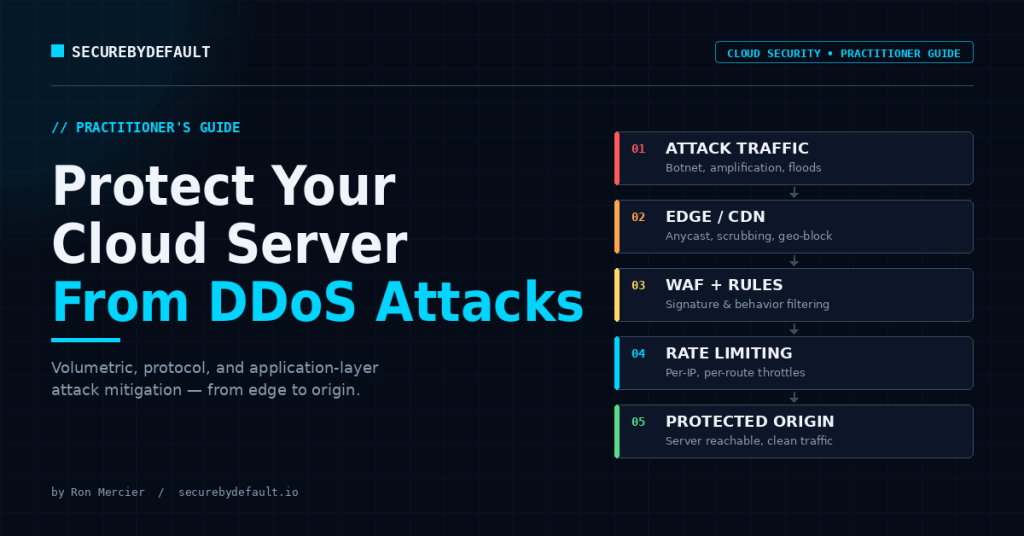
After I documented my Linode server taking 4,000+ failed login attempts in 24 hours, the next obvious question was: what happens when attackers stop trying to log in and just try to take you offline?
Most DDoS articles are written by people who have never watched a real attack hit a real server in real time. You can tell, because they read like a glossary. “A DDoS attack is when an attacker sends a large volume of traffic…” Yes. Thank you. Very helpful at 2 a.m. when your load balancer is on fire.
I spent a chunk of my career doing DDoS mitigation and incident response at Akamai; one of the companies whose entire job is absorbing attacks so other companies’ websites stay up. I’ve watched attacks ramp from zero to terabits, watched legitimate traffic get caught in the blast radius, and watched the specific, unglamorous decisions that actually determine whether a service stays online or falls over. This guide is the version I wish existed: what actually matters, in the order it actually matters, for someone running a cloud server who would prefer it stay reachable.
No fear-mongering. No “contact us for a quote.” Just the practitioner’s mental model.
First, Forget the Hollywood Version
A DDoS attack isn’t a genius hacker furiously typing. It’s overwhelmingly automated, rented, and boring. Someone pays a small amount of money to a booter service, points a botnet of compromised devices and misconfigured cloud workloads at your IP, and walks away. The sophistication isn’t in the attacker. It’s in the asymmetry: it costs them almost nothing and can cost you a weekend, your reputation, and a genuinely upsetting cloud bill.
That last point matters more than people realize. In the cloud, a DDoS attack has two ways to hurt you. The obvious one is downtime. The sneakier one is the bill; if your infrastructure auto-scales, an attack can quietly inflate your costs into the stratosphere without ever taking you offline. The industry even has a name for this now: an economic denial of service attack. Your service stays up; your wallet does not. Keep that in the back of your mind for later.
And one mental model to carry through the whole guide: DDoS defense is not about being unbeatable. Even a partially successful attack that just degrades performance is a win for the attacker. The goal is resilience and graceful degradation, not a magic forcefield. Anyone selling you a magic forcefield is selling you something.
The Three Types of Attack You Actually Need to Care About
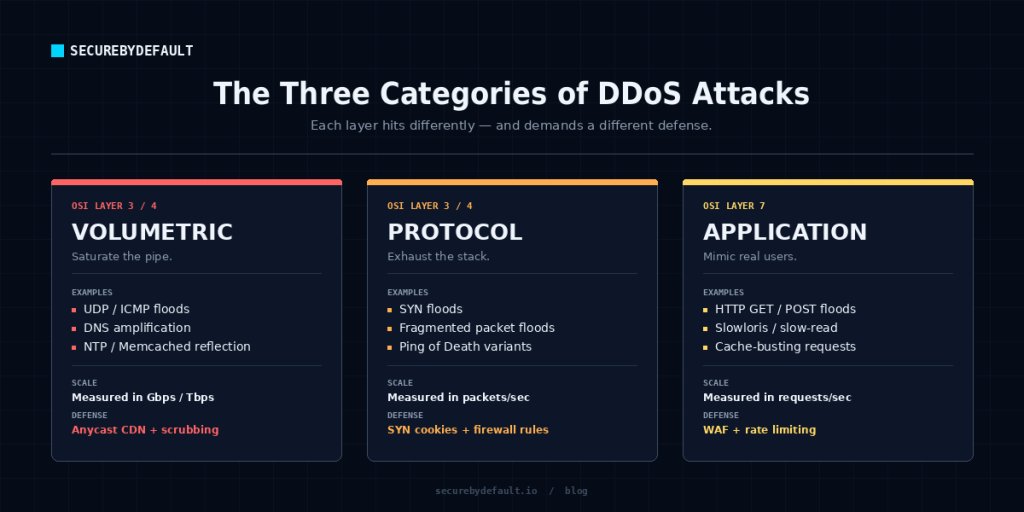
People love to overcomplicate this. There are really three buckets, and they map to where the attack hits you.
Volumetric attacks (the firehose). These try to saturate your bandwidth with sheer volume; UDP floods, amplification attacks, the classic “so much traffic the pipe is full” approach. They’re loud, obvious, and the type cloud providers’ baseline protections handle best.
Protocol / state-exhaustion attacks (the slow drain). These don’t fill your pipe, they exhaust the connection state in your firewalls, load balancers, and servers. The SYN flood is a classic. Less traffic, but it ties up the machinery that tracks connections until nothing legitimate can get through.
Application-layer attacks (the assassin). Layer 7. These are the dangerous ones in 2026. Instead of brute volume, the attacker sends requests that look almost exactly like real users; hammering your search endpoint, your login, your contact form, anything that makes your database and application work hard. Low traffic, high damage, and brutally difficult to distinguish from a legitimate traffic spike. This is where modern attacks have moved, because baseline volumetric protection is now common and attackers adapt.
Why this matters: the defenses are different for each. A solution that absorbs a volumetric flood does nothing against a clever Layer 7 attack on your login endpoint. Anyone who tells you one product solves “DDoS” entirely is skipping the part where attacks have layers.
The Single Most Important Concept: Don’t Let Them Find Your Origin
If you remember one thing from this entire guide, make it this.
The most common way DDoS protection fails isn’t that the protection is weak. It’s that the attacker bypasses it entirely by attacking your origin server’s real IP address directly, going around the CDN or scrubbing service you carefully set up.
Attackers find your origin IP in embarrassingly easy ways: old DNS records still floating in DNS history services, your real IP sitting in certificate transparency logs, an error page that leaks it, or a subdomain that points straight at the box. Then they skip your expensive front door and knock the back one down.
The practitioner’s rule: your origin should only ever accept traffic from your protection layer, never from the open internet. Lock your server’s firewall so it only accepts connections from your CDN or scrubbing provider’s IP ranges. Test it yourself, and try to reach your application by its raw IP instead of its domain. If it answers, you have a hole, and an attacker will eventually find it. This one configuration step defeats a huge percentage of real-world attacks, and it costs nothing but attention.
The Defense-in-Depth Stack (What I’d Actually Build)
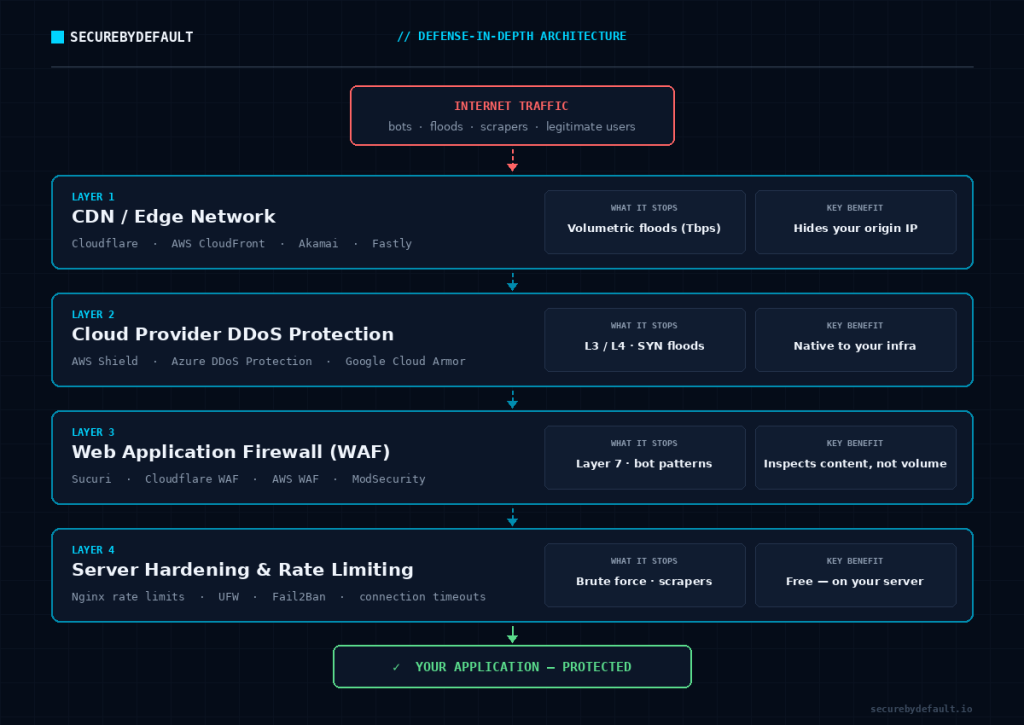
Here’s the layered approach, from the edge inward. You don’t need all of it on day one, but you should know what each layer does so you can decide what your situation actually requires.
Want the 25-point security checklist I actually use? It’s the same baseline I run against real infrastructure – free, no fluff.
Get the Free Checklist →Layer 1 – A CDN / edge network in front of everything. This is the highest-leverage move for most people. Putting a content delivery network with DDoS protection in front of your server (Cloudflare’s free tier is the obvious starting point for small operations and genuinely capable) does two enormous things at once: it absorbs volumetric attacks across a massive distributed network you could never build yourself, and it hides your origin IP. For a small cloud server, this single layer is the difference between “survivable” and “smoking crater.”
Layer 2 – Your cloud provider’s native DDoS protection. AWS Shield, Azure DDoS Protection, and Google Cloud Armor. Every major provider has baseline protection that handles common network and transport-layer attacks, often free and always-on. The catch most people miss: it usually has to be explicitly enabled and validated, and it protects layer 3/4, not your application layer. Turn it on. Confirm it’s actually on. Don’t assume.
Layer 3 – A Web Application Firewall (WAF). This is your defense against the Layer 7 assassin. A WAF inspects actual requests and filters the malicious ones; bot patterns, abusive request rates, attacks on specific endpoints. This is where you fight the attacks that look like real users, because a WAF can apply rules a dumb volume filter can’t.
Layer 4 – Server-level hardening and rate limiting. The stuff you control directly on the box. Rate limiting at your web server (Nginx and others do this well), connection limits, sensible timeouts, and a firewall configured to deny by default. This won’t stop a terabit flood, but it makes you dramatically more resilient to the smaller, more common attacks, which are the ones you’ll actually face.
Layer 5 – Architecture that degrades gracefully. Load balancing across multiple instances so there’s no single point of failure. Caching aggressively so attack traffic hits cache, not your database. And critically: scaling limits and billing alerts so an economic denial of service attack can’t auto-scale you into bankruptcy while you sleep. Set a ceiling. Set an alarm. Future-you will be grateful.
The Part Everyone Skips: Have a Plan Before You Need One
Here is the single biggest difference between teams that survive attacks and teams that don’t, and it has nothing to do with technology.
The teams that survive have a written incident response plan, and they’ve practiced it. The teams that don’t have a Slack channel that turns into a panic room.
The middle of a live DDoS attack is the worst possible time to figure out who has access to the CDN dashboard, what your cloud provider’s emergency support number is, how to enable “under attack” mode, or who is even supposed to be making decisions. All of that needs to be decided on a calm afternoon, written down somewhere you can find it when production is down, and rehearsed at least once.
A practitioner’s incident plan answers, in advance: How do we know it’s an attack and not a traffic spike? Who declares the incident? What’s the first mitigation we reach for? Who do we call and do we have the number? How do we communicate with users while it’s happening? And afterward: what did we learn, and what do we change? Run a 30-minute tabletop exercise once. You’ll find three things broken in your plan, and finding them on a Tuesday is infinitely better than finding them during the real thing.
One more practitioner’s note from real incidents: attackers sometimes use DDoS as a smokescreen. While everyone’s staring at the traffic graph and fighting the flood, the actual objective was credential theft, data exfiltration, lateral movement, which happens quietly in the noise. If you get hit, don’t tunnel-vision on the flood. Have someone watching the rest of the house while everyone else fights the fire at the front door.
So What Should You Actually Do? (The Honest Priority List)
If you run a small cloud server and read this whole thing waiting for the “just tell me what to do” part, here it is, in order.
Do these this week: Put a CDN with DDoS protection in front of your server (Cloudflare’s free tier is a legitimate answer). Lock your origin firewall so it only accepts traffic from that CDN. Verify your cloud provider’s baseline DDoS protection is actually enabled. Set billing alerts and scaling caps so an attack can’t bankrupt you quietly.
Do these this month: Add a WAF and tune basic rules for your application’s real endpoints. Configure rate limiting and sensible connection limits at your web server. Write a one-page incident response plan and save it somewhere you can reach when the site is down.
Do this once, then quarterly: Run a 30-minute tabletop exercise of an attack. Confirm your origin still isn’t reachable directly (configurations drift). Update the plan with whatever you learned.
None of this requires a six-figure budget or a dedicated security team. The expensive enterprise scrubbing services exist for a reason, but the overwhelming majority of cloud servers are taken down by attacks that the free-and-cheap layers above would have absorbed, if they’d been set up before the attack instead of during it.
That’s the whole secret, honestly. DDoS defense isn’t won during the attack. It’s won on the quiet afternoon when you decided to set it up properly. Pick the afternoon.
Key Takeaways
- DDoS attacks are cheap, automated, and asymmetric. The danger is the imbalance between their cost and yours, including a runaway cloud bill (economic denial of service).
- There are three attack types: volumetric, protocol/state-exhaustion, and application-layer (L7), and they require different defenses. L7 is the dangerous modern one.
- The #1 cause of failed DDoS protection is origin IP exposure. Lock your server to only accept traffic from your CDN/scrubbing layer, and test it.
- Build defense-in-depth: CDN/edge → cloud-native DDoS protection → WAF → server hardening/rate limiting → graceful-degradation architecture.
- Set scaling caps and billing alerts so an attack can’t auto-scale you into bankruptcy.
- A written, rehearsed incident response plan separates teams that survive from teams that panic. Run a tabletop exercise quarterly.
- DDoS can be a smokescreen for data theft, so don’t let the flood distract from the rest of the house.
- You don’t need to be unbeatable, just resilient. Defense is won before the attack, not during it.
Get the security checklist most
businesses skip.
A free 25-point audit covering the exact gaps attackers hit first — engineer-built, no jargon. Plus one practical security breakdown every Tuesday. No fluff, no fear-mongering.
Get the Free Checklist →Free on signup · Unsubscribe anytime · ~1 email per week