
Excel 4.0 macros are older than most SOC analysts. They date to 1992, were designed for legitimate spreadsheet automation, and were effectively obsolete by the time VBA arrived in Office 97. Microsoft never removed them. Attackers noticed.
The reason Excel 4.0 macros — also called XLM macros — keep showing up in phishing campaigns is simple: most organizations block VBA macros. Endpoint protection tools are tuned to catch VBA. Security awareness training warns employees about VBA. But XLM? The old format gets far less scrutiny, it runs without triggering the same warnings, and it can call the same dangerous Windows utilities as its modern equivalent. Defenders got good at blocking the new thing and forgot about the old one.
SOC146 is a textbook example of this technique in practice. Here’s how the investigation went — and more importantly, why each step matters.
The Alert
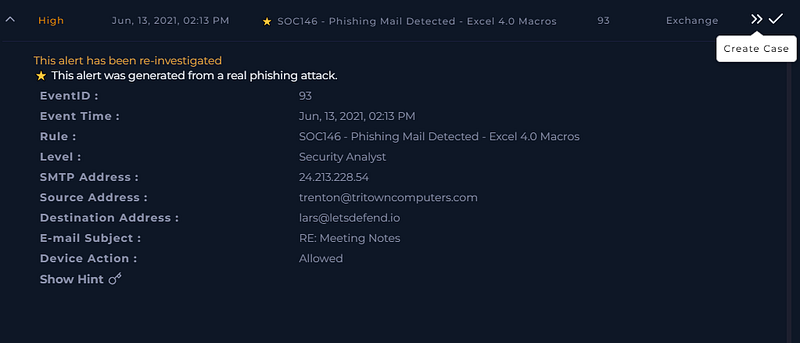
EventID: 93 — SOC146 — Phishing Mail Detected — Excel 4.0 Macros
First action: take ownership of the alert and open a case. This matters not just administratively — starting a case creates a timestamp, establishes a chain of custody for your findings, and ensures nothing is lost if the investigation runs long or is handed off to another analyst. In a real SOC environment, owning it means you’re accountable for it. That accountability is what keeps investigations from falling through the cracks.
Then: start the playbook. A playbook is a structured decision tree for a specific incident type. It sounds bureaucratic, but it serves a real purpose — under pressure, during a live incident, a playbook keeps you from skipping steps. The questions it asks are the questions you’d eventually ask anyway. It just makes sure you ask them in the right order before you start taking action.
Step 1 — Examine the Email
The first job is understanding what we’re dealing with. Navigate to the Email Security tab and use the SMTP address from the alert to pull the email logs. What we find:
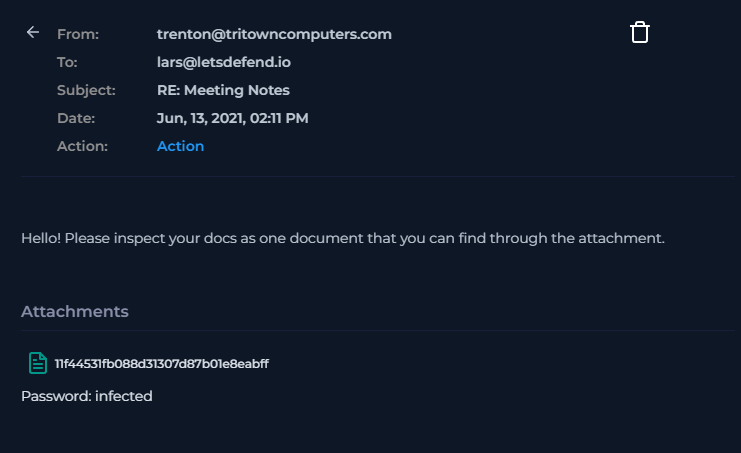
Sent: June 13, 2021, 2:11 PM
SMTP (sending server): 24.213.228.54
Sender address: trenton@tritowncomputers.com
Recipient: lars@letsdefend.io
Attachment: 11f44531fb088d31307d87b01e8eabff.zip
The sender domain — tritowncomputers.com — is worth noting. It looks like a plausible small business. That’s deliberate. This isn’t a Nigerian prince email with obvious tells. The sender has a real-looking domain and a real-looking name. The email content was flagged as suspicious, but subtle. This is what modern phishing looks like: just credible enough to make someone hesitate before deleting it.
The attachment name is also worth flagging immediately. 11f44531fb088d31307d87b01e8eabff is an MD5 hash — someone took the file’s hash and used it as the filename, a pattern associated with automated malware distribution. The zip extension tells us we need to look inside before we know what we’re actually dealing with.
At this point in the playbook, is the email suspicious? Yes. Continue with the investigation.
Step 2 — Analyze the Attachment
Never open a suspicious attachment on a production machine. This should be obvious, but it’s worth saying clearly because the cost of getting it wrong is an active compromise on your own endpoint, which is a significantly worse day than the one you started with.
Download the attachment and extract it in an isolated environment. REMnux is a solid choice for this — it’s a Linux distribution built specifically for malware analysis. I used the LetsDefend built-in Linux sandbox, which works for the same reason: isolated, disposable, no path back to anything that matters.
The zip contains three files:
research-1646684671.xls — the delivery mechanism
iroto.dll — malicious DLL, payload component
iroto1.dll — second malicious DLL, payload component
The XLS filename pattern (filename-timestamp.xls) is another automated distribution tell. This wasn’t crafted manually for lars@letsdefend.io — it was generated and sent at scale.
The three-file structure immediately suggests the attack chain: the XLS executes first and uses the DLLs to do its real work. DLLs (Dynamic Link Libraries) are shared code libraries that Windows applications load at runtime. Attackers bundle malicious DLLs with their payloads because these DLLs can be loaded by legitimate Windows utilities, making them much harder to detect and block than standalone executables.
Step 3 — VirusTotal Scan
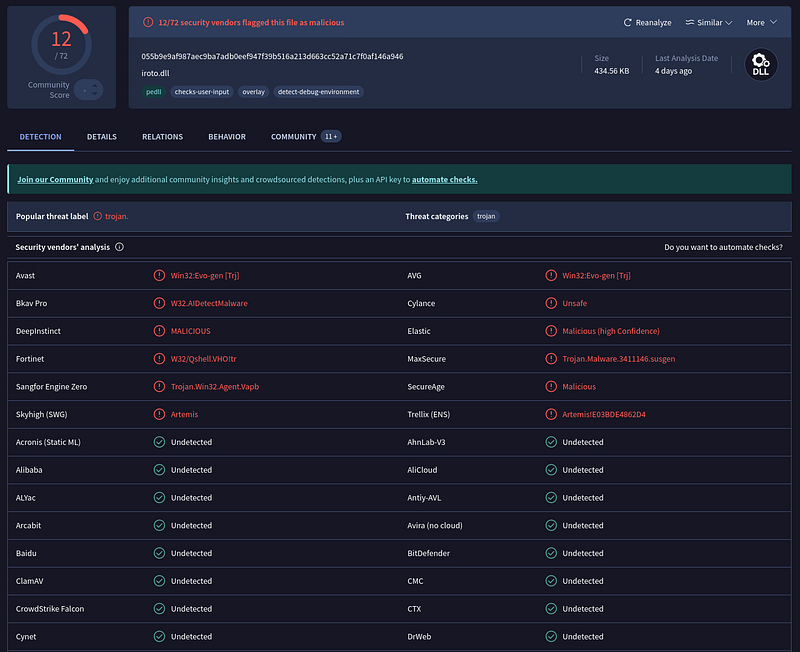
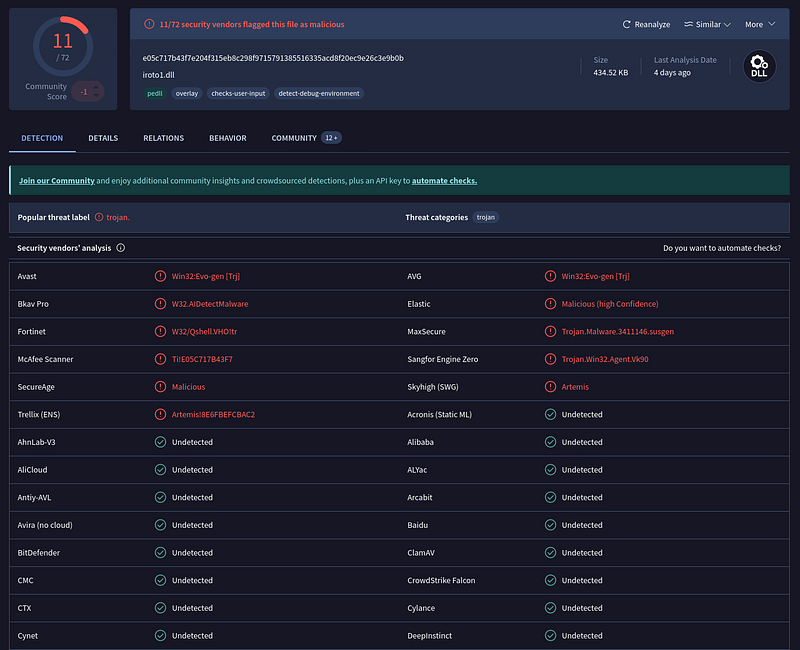
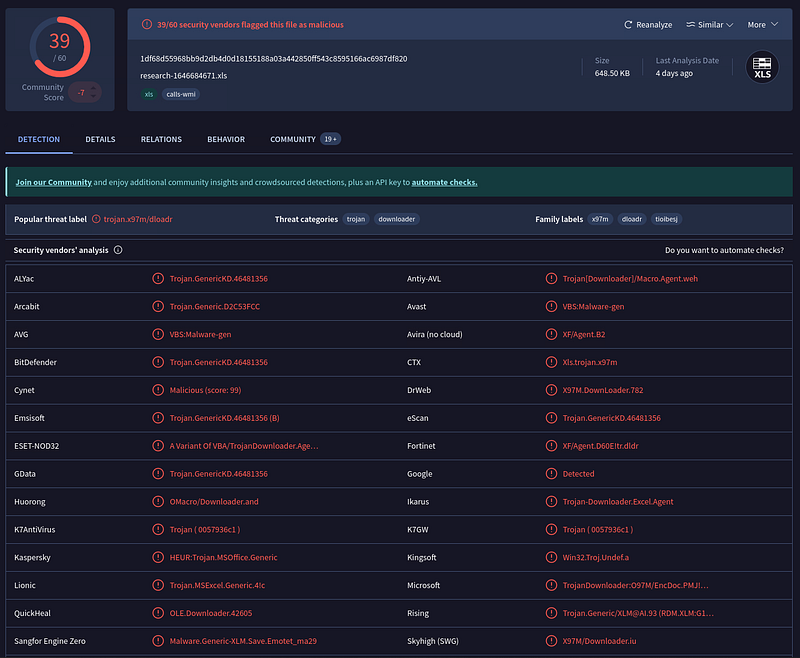
Run all three files through VirusTotal. VirusTotal aggregates results from dozens of antivirus engines and gives you a quick picture of whether a file is known malicious and what family it belongs to.
Results: all three files come back flagged as malicious. That confirms what the structure suggested — this isn’t an accidental zip or a false positive. But VirusTotal alone isn’t the whole picture. It tells you a file is bad. It doesn’t tell you what it does, which matters for understanding scope and writing a useful incident summary.
That’s what the sandbox is for.
Dynamic Link Libraries (DLL) are an essential Windows operating system component, providing reusable code and functionality that multiple programs can utilize.
By placing a malicious DLL in a location where an application searches for the required DLL, attackers can execute arbitrary code with the privileges of the hijacked application. This allows them to compromise the integrity and security of the system.
Step 4 — Sandbox Analysis (AnyRun)
AnyRun is an interactive malware sandbox — you submit a file, it executes in a controlled environment, and you watch what happens. Process tree, network connections, file system changes, registry modifications. The attack plays out in front of you.
What AnyRun shows for research-1646684671.xls:
The Excel file executes its XLM macros on open. Those macros call regsvr32.exe — the Windows utility for registering DLLs — to load iroto.dll and iroto1.dll. This is the core of the Excel 4.0 macro technique: use a built-in Windows tool (regsvr32) to execute the malicious payload. Regsvr32 is a legitimate, signed Microsoft binary. Many security tools and detection rules don’t flag it by default. The malicious activity is occurring within the DLL being loaded, not in the utility loading it.
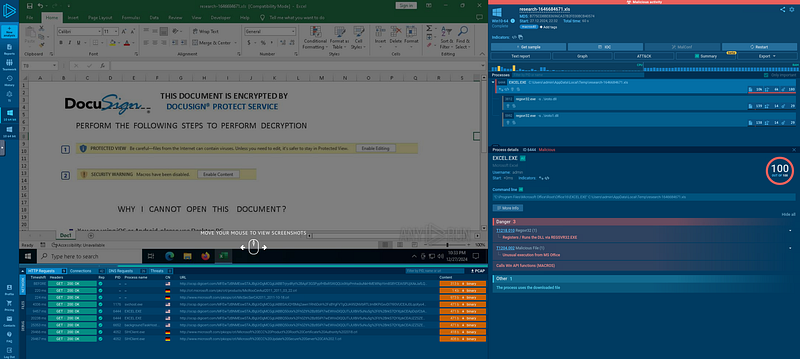
This technique maps to MITRE ATT&CK T1218.010 (Signed Binary Proxy Execution: Regsvr32). The XLM macros themselves map to T1137.001 (Office Application Startup: Office Template Macros), and the delivery via spearphishing attachment maps to T1566.001.
After the DLLs load, the malware establishes outbound network connections to two C2 (command and control) domains:
nws.visionconsulting.ro
royalpalm.sparkblue.lk
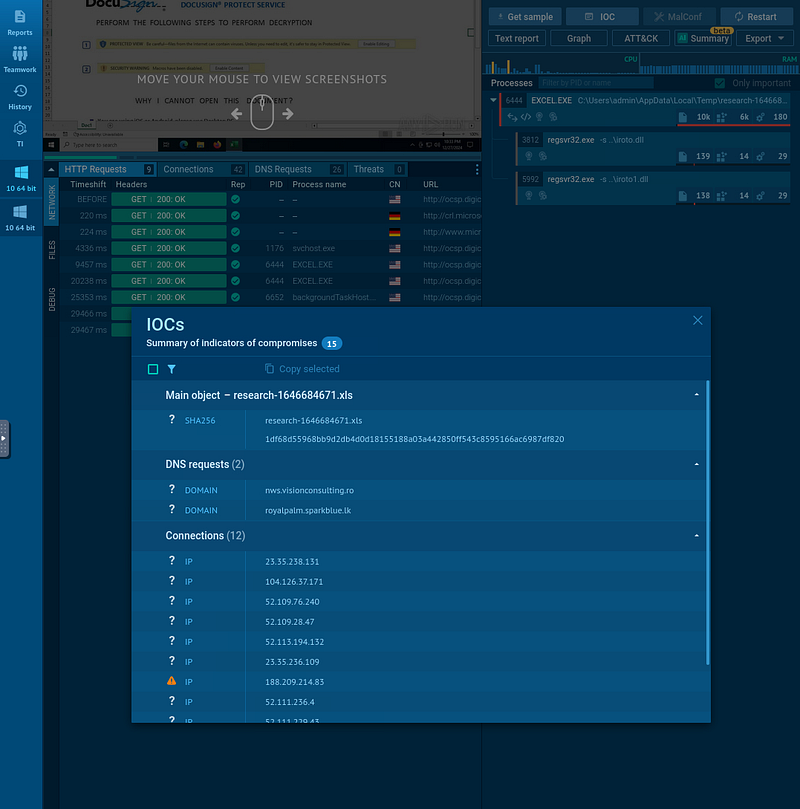
C2 infrastructure is where attackers maintain communication with a compromised host — sending commands, receiving exfiltrated data, and potentially downloading additional payloads. The presence of C2 beaconing in the sandbox analysis indicates that this isn’t just a malware sample. This is a full compromise chain: delivery → execution → persistence attempt → calling home.
Step 5 — Was It Delivered? Did They Open It?
Two questions that change everything about the response.
Check the alert details for Device Action. The email was marked Allowed — it was delivered to lars@letsdefend.io’s inbox. The mail gateway didn’t catch it. That moves this from ‘attempted phishing’ to ‘delivered phishing,’ and the response changes accordingly.
Immediate action: delete the email from the recipient’s mailbox. This prevents the user from opening it if they haven’t already — and more importantly, from forwarding it or accessing it on another device.
Now the critical question: did lars open it?
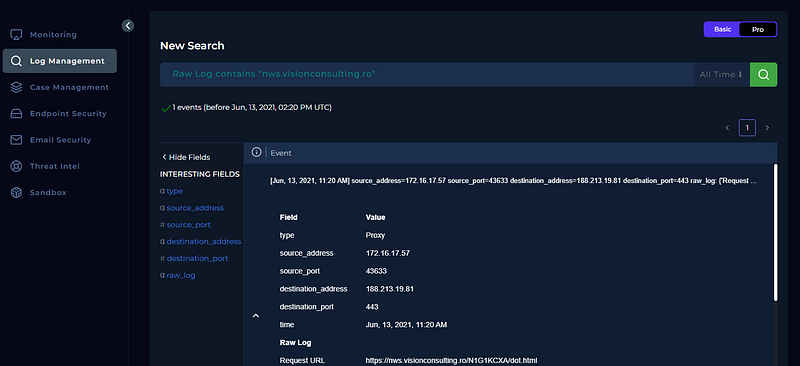
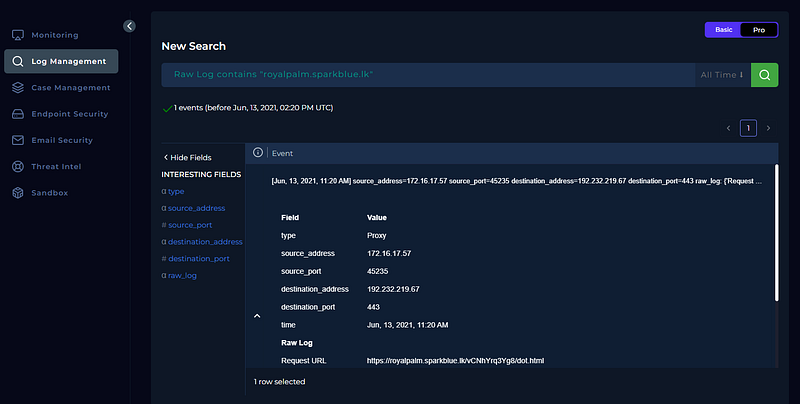
Take the C2 domains from AnyRun and search them in Log Management. What comes back: outbound GET requests from an internal IP to both nws.visionconsulting.ro and royalpalm.sparkblue.lk. The device action on those requests was allowed. The connection went through.
This confirms it. The file was opened. The macros ran. The DLLs are loaded. The malware successfully called home. This is no longer a phishing attempt — it’s an active compromise.
Step 6 — Identify and Contain the Endpoint
Use the source IP from the log management results to find the endpoint in Endpoint Security. The internal IP traces back to the device LarsPRD — Lars’s workstation.
Review the endpoint’s command history before containment. The CMD history on LarsPRD confirms regsvr32 execution — matching exactly what the AnyRun sandbox predicted would happen. Browser history and network connections show sustained communication with the malicious domains.
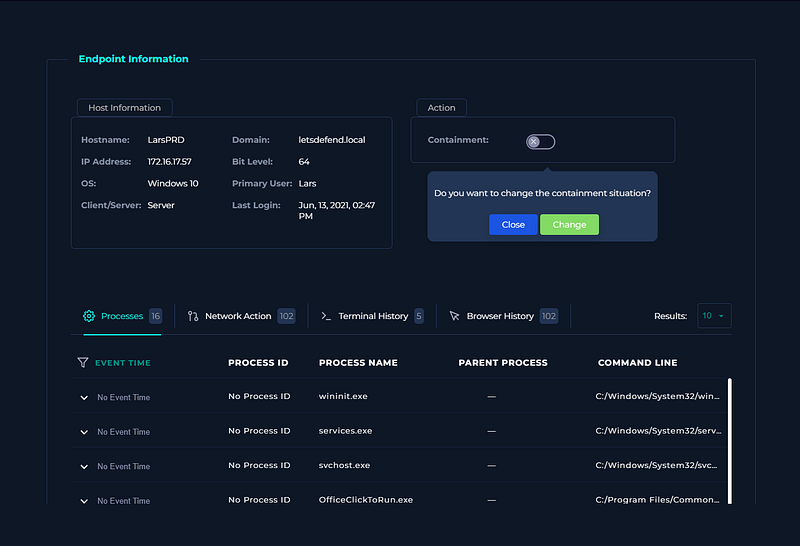
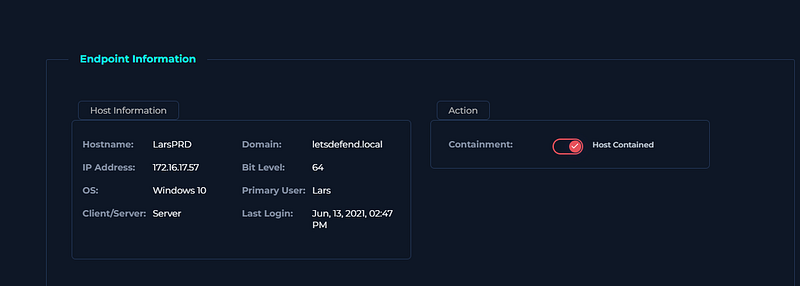
Contain the machine immediately. Containment in an endpoint management tool cuts the device off from the network while preserving its state for forensics. Don’t wipe it. Don’t reimage it yet. The device is evidence. Isolate it, document what you found, and preserve the artifacts for the post-incident investigation.
Step 7 — Artifacts and Verdict
Document your artifacts. In incident response, an artifact is any piece of evidence generated during the incident — file hashes, IP addresses, domains, process names, registry entries. These are logged for threat intelligence, for the post-incident report, and to ensure that other alerts referencing the same indicators are correctly correlated.
Artifacts from this investigation:
SMTP server: 24.213.228.54
Sender: trenton@tritowncomputers.com
Attachment hash (ZIP): 11f44531fb088d31307d87b01e8eabff
Malicious XLS: research-1646684671.xls
DLL payloads: iroto.dll, iroto1.dll
C2 domain 1: nws.visionconsulting.ro
C2 domain 2: royalpalm.sparkblue.lk
Compromised device: LarsPRD
Malicious process: regsvr32.exe loading iroto.dll / iroto1.dll
Verdict: True Positive.
The email was a phishing attempt carrying an Excel 4.0 macro payload. The file was delivered, opened, and executed. The XLM macros invoked regsvr32 to load two malicious DLLs, which established C2 communication with two external domains. Log evidence confirmed the outbound connections succeeded. The endpoint LarsPRD has been confirmed compromised and contained.
Why Excel 4.0 Macros Specifically
The question worth asking after every incident is: why did this work? Not just technically — that part we’ve covered — but why did it work when it should have been caught?
Excel 4.0 macros persist in modern Office not because Microsoft forgot about them, but because removing them would break legitimate legacy workflows. That’s a real operational constraint, and it’s one that attackers actively exploit. VBA macro security controls — which Microsoft has strengthened significantly over the years, and which many organizations configure aggressively — don’t apply to XLM macros by default. An organization that locked down VBA macros and felt good about it may have left XLM completely open.
The regsvr32 technique compounds this. By calling a signed, legitimate Windows binary to do the malicious work, the attack avoids the profile of ‘malware executing directly.’ The malicious code runs with the permissions of regsvr32, which is trusted by the operating system. Application whitelisting that doesn’t account for signed binary proxy execution won’t stop this.
The practical takeaway isn’t ‘trust nothing’ — that’s not actionable. It’s: know what your defenses actually cover and what they don’t. If your organization restricts VBA macros, verify that XLM macros are also restricted. If you use application whitelisting, check whether it accounts for regsvr32 abuse. The gap between ‘we have controls’ and ‘we know what our controls cover’ is exactly where this kind of attack lives.
MITRE ATT&CK Mapping
T1566.001 — Phishing: Spearphishing Attachment (initial delivery)
T1137.001 — Office Application Startup: Office Template Macros (XLM macro execution)
T1218.010 — System Binary Proxy Execution: Regsvr32 (DLL loading via signed binary)
T1055 — Process Injection (malicious DLL loaded into legitimate process)
T1071.001 — Application Layer Protocol: Web Protocols (C2 over HTTP/S)
T1105 — Ingress Tool Transfer (DLL payloads delivered with the initial attachment)
Key Takeaways
- Excel 4.0 (XLM) macros predate VBA and bypass many macro security controls that organizations think protect them. If you block VBA macros, verify XLM is also restricted.
- Two DLLs bundled with an XLS in a ZIP is a recognizable loader pattern. The structure of an attachment tells you something before you even open it.
- Regsvr32 executing a DLL from an unexpected location is a high-confidence malicious indicator. It maps to a well-documented MITRE technique and should trigger immediate investigation.
- VirusTotal tells you a file is bad. AnyRun tells you what it does. You need both to write a useful incident summary.
- C2 beaconing in sandbox analysis means treat the incident as active compromise, not attempted compromise. The response is different.
- Contain before you remediate. The endpoint is evidence. Isolate it, document it, then remediate.
- The gap between ‘we have security controls’ and ‘we know what our controls actually cover’ is where this class of attack lives.
Get the security checklist most
businesses skip.
A free 25-point audit covering the exact gaps attackers hit first — engineer-built, no jargon. Plus one practical security breakdown every Tuesday. No fluff, no fear-mongering.
Get the Free Checklist →Free on signup · Unsubscribe anytime · ~1 email per week