
What broke, what I found, and the three things I deleted
My portfolio site has been running on AWS for a while now: S3, CloudFront, Route 53, plus a small serverless backend (Lambda, API Gateway, DynamoDB) that counts visitors. The backend was built with SAM. The rest was a mix of console clicking and good intentions. It works, but if you asked me to rebuild it from scratch tomorrow, I would be doing a lot of remembering and a lot of squinting at the console.
So I put the whole thing into Terraform. Not a fresh copy sitting next to the old one, but the actual live infrastructure, imported into state, with no downtime. This post covers how that went, the errors I hit (several were my own fault), and the part I did not expect: I found things in my own AWS account that I never put there on purpose.
Who this is for
This is not a from-scratch Cloud Resume Challenge tutorial. It is about bringing existing, live AWS infrastructure under Terraform management without rebuilding it.
You will get the most out of it if you have:
- Basic AWS familiarity (you know what S3, Lambda and IAM are)
- The AWS CLI installed and configured
- Terraform installed
- Some existing AWS infrastructure you would like to manage with Terraform
- Git
- Enough comfort reading a terraform plan to spot the word “destroy”
Project repositories
| Repo | What it holds |
|---|---|
| terraform-cloud-resume | The main repo for this post: Terraform for the infrastructure configuration |
| cloud-resume-backend | Lambda code, SAM template and the backend GitHub Actions pipeline |
| AWS-S3-Static-Website | The website files and the frontend GitHub Actions pipeline |
What is actually deployed
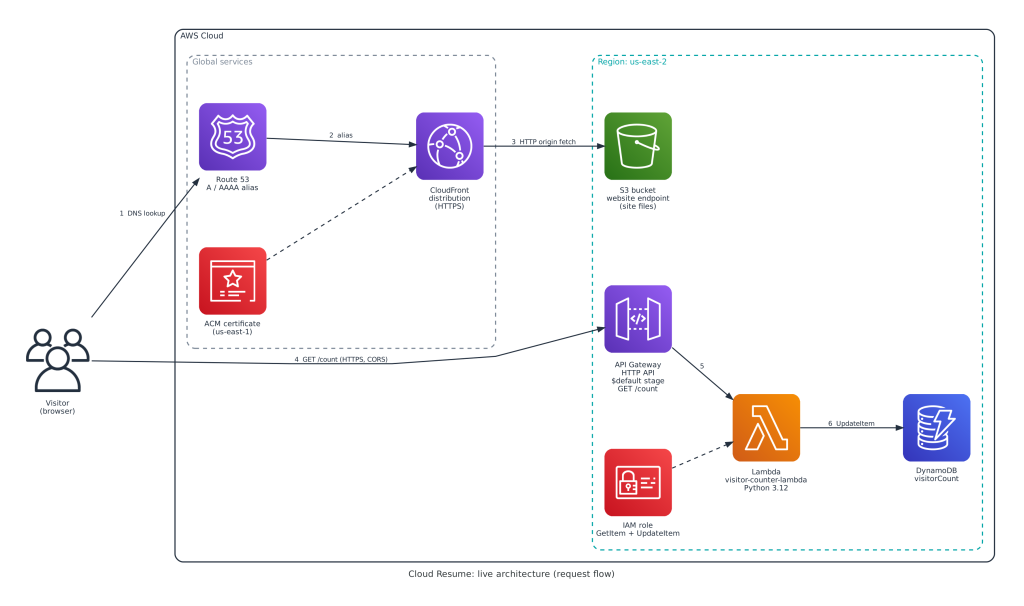
Visitors reach the site through Route 53 and CloudFront, which pulls from S3. The browser then calls API Gateway, which invokes Lambda, which reads and writes DynamoDB.
One thing I want to be clear about, because it is easy to get wrong: Terraform does not own everything here.
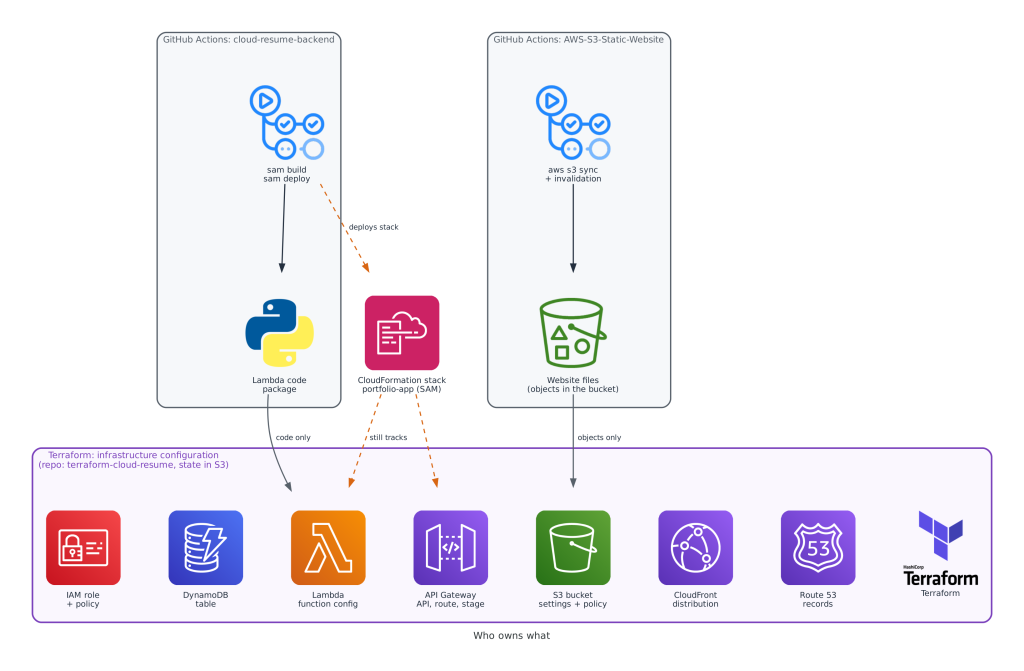
- Terraform owns the infrastructure configuration: the DynamoDB table, IAM role, Lambda function settings, API Gateway, S3 bucket settings, CloudFront and the Route 53 records.
- SAM and GitHub Actions (backend repo) own the Lambda application code.
- GitHub Actions (frontend repo) owns the website files in the bucket.
The SAM-created CloudFormation stack (portfolio-app) still exists and still tracks some of these resources. I come back to that at the end, because it is an open item and not a solved one.
The rule: import first, improve second
Importing live infrastructure is a bit like changing a tire on a moving car, except the car is your resume. So I stuck to one workflow for every single resource:
- Look at the real thing with the AWS CLI (describe-table, get-function, and friends).
- Write Terraform that matches it.
- Run terraform import.
- Run terraform plan, and touch nothing until it says “No changes” or shows a difference I fully understand.
Only after a resource is clean do I change anything on purpose. That way every improvement shows up as its own small, readable diff instead of being buried inside the import.
What terraform import actually does
If you have not used it before, here is the part that trips people up: terraform import does not write any configuration for you. It does not change the AWS resource either. All it does is record in Terraform’s state that “this resource address in my code is that real thing in AWS.” You still write the configuration yourself.

That is why the plan afterward matters so much. The plan compares the configuration you wrote against the real resource. If they match, you get “No changes” and a clean baseline. If they do not, Terraform tells you exactly where.
During the import phase, if the first plan shows an unexpected difference, make the Terraform configuration match the existing live resource until you have a clean baseline. Make intentional infrastructure changes only after that.
Walkthrough 1: the DynamoDB table (the warm-up)
Find the real thing:
aws dynamodb describe-table --table-name visitorCountThat gave me the key schema (id, string), the billing mode (pay per request) and deletion protection (on).
Write a matching resource (dynamodb.tf), with the resource address
aws_dynamodb_table.visitor_count:
resource "aws_dynamodb_table" "visitor_count" {
  name         = "visitorCount"
  billing_mode = "PAY_PER_REQUEST"
  hash_key     = "id"

  attribute {
    name = "id"
    type = "S"
  }

  deletion_protection_enabled = true
}
Import it. For a DynamoDB table the import ID is just the table name:
terraform import aws_dynamodb_table.visitor_count visitorCount
Plan. My first plan after import showed one change: Terraform wanted to add two tags (Project and Environment). I had put them in my config, and the live table did not have them. Honest note: that bends my own rule, since I changed something on purpose before the baseline was clean. It was two tags on a table, I understood the diff completely, and I kept them. The tags are in the repo now. If you want to follow the rule strictly, delete the tags from your config until the plan is clean, then add them back as their own change.
Walkthrough 2: an API Gateway route
Find the real thing:
aws apigatewayv2 get-apis
aws apigatewayv2 get-routes --api-id <api-id>
The route list gives you a route ID alongside the route key. (The output is trimmed here, and I am showing the command shape rather than pasting my account’s output.)
Write a matching resource, address aws_apigatewayv2_route.count_get:
resource "aws_apigatewayv2_route" "count_get" {
  api_id             = aws_apigatewayv2_api.http_api.id
  route_key          = "GET /count"
  target             = "integrations/${aws_apigatewayv2_integration.lambda.id}"
  authorization_type = "NONE"
}
Import it. API Gateway v2 routes use api-id/route-id as the import ID:
terraform import aws_apigatewayv2_route.count_get <api-id>/<route-id>Plan. After importing the API, integration, routes and stage, the plan came back clean. That is where it got interesting.
Setup: three small speed bumps
Installing Terraform
My first attempt to add the HashiCorp repo failed with a NO_PUBKEY error. I had piped the key download straight into gpg, and the key never saved correctly. The fix was boring: download the key to a file first, then dearmor it as a separate step. Piping is great until it fails silently.
wget -O /tmp/hashicorp.gpg https://apt.releases.hashicorp.com/gpg
sudo gpg --dearmor -o /usr/share/keyrings/hashicorp-archive-keyring.gpg
/tmp/hashicorp.gpg
Credentials that expired overnight
The AWS CLI worked fine on day one. The next day: InvalidClientTokenId. Same machine, same config, nothing changed. The clue was in the access key ID prefix. Keys starting with AKIA are long-term IAM user keys. Keys starting with ASIA are temporary session credentials that expire. Mine started with ASIA.
The fix was a dedicated IAM user (terraform-deploy) with a long-term key, used for this migration. Two details worth knowing. First, aws configure does not remove an old aws_session_token line from the credentials file, so check for one or the stale token gets paired with your new key. Second, aws sts get-caller-identity is the fastest way to confirm who AWS thinks you are before running anything bigger. While I was in there I also fixed the default region, which had quietly been set to us-east-1 when everything lives in us-east-2.
A note on that fix, because I do not want it read as a recommendation: a long-term key on a server is what I used here, not what I would pick for a fresh setup. If you are starting clean, short-lived credentials are the better habit: IAM Identity Center (SSO) or an assumed role, so nothing long-lived sits on disk. If you do use a long-term key for a migration like mine, treat it as temporary and remove it when the work is done.
Remote state first
Before touching the real infrastructure, I bootstrapped the state backend with a tiny separate config: an S3 bucket (versioned, encrypted, public access blocked, prevent_destroy on) and a DynamoDB table for state locking. Running the bootstrap with local state avoids the chicken-and-egg problem of Terraform needing a backend to create its own backend.
On locking, here is where things stand. I used DynamoDB locking during this migration, and the repo still does. Terraform warns that dynamodb_table is deprecated, and current versions of the S3 backend support native locking with use_lockfile = true. If you are setting this up fresh, evaluate use_lockfile first. I have not moved my own setup yet, and I did not remove the DynamoDB lock table, so treat that as a future change and not something I have done.
The backend half: DynamoDB, IAM, Lambda, API Gateway
DynamoDB was the warm-up, covered above.
The IAM role and policy produced a scarier diff, with Terraform appearing to remove and re-add the same permissions. It was only rendering a change to a JSON string. The one real difference was the explicit policy Version field. Cosmetic.
Lambda was the first real error:
Error: one of `filename,image_uri,s3_bucket` must be specifiedThe Lambda resource requires a code source even when you plan to ignore code changes. My SAM and GitHub Actions pipeline already owns deployments, so I pointed filename at a throwaway placeholder.zip and told Terraform to ignore filename and source_code_hash. Terraform manages the function’s configuration, the pipeline manages its code, and nobody fights.
API Gateway took six imports: the API, the integration, three routes, and the stage.
The finding: routes and a permission nobody asked for
When I listed the API’s routes, there were three:
- GET /count (the one my site actually uses)
- ANY /
- ANY /{proxy+}
Then I pulled the Lambda’s resource policy and found two invoke permissions. One was the SAM-generated permission, scoped to GET /count only. The other allowed API Gateway to invoke the function from any stage, any method, any path, and its name did not look like anything SAM generates.
Together, those extras meant every path and method on the API reached my Lambda, not just the one request my site makes. For a visitor counter this is not a breach and not a disaster. It is exactly the kind of drift that makes an attack surface bigger than anyone intended.
Before deleting anything I checked two things:
- The SAM template. It defines exactly one event, GET /count, so the pipeline would not recreate the extras.
- The frontend. index.html calls the /count endpoint directly. Removing the catch-alls could not break the site.
I removed the two routes and the broad permission through Terraform. The plan said 0 to add, 0 to change, 3 to destroy, and nothing else. Then I tested from the outside:
GET  /count        returns 200
GET  /prod/count   returns 404
POST /count        returns 404
The real endpoint works and everything else is gone.
That /prod/count result deserves its own mention. My earlier API security assessment tested a /prod/count path. This API’s stage is $default, so I believe that path was being served by the catch-all route, not by the route I thought I was testing. (That is an inference from the before and after behavior, not something I traced request by request.) The assessment’s test scripts now need an update. Codifying infrastructure does not just document it, it questions it.
The frontend half: S3, CloudFront, Route 53
The front end had a smaller footprint than I expected: one bucket, one CloudFront distribution, and a hosted zone with a handful of records. I made two deliberate choices. The Route 53 hosted zone is a read-only data source, because a mistake there can take a domain offline. And the DNS validation records for the live certificate are managed with prevent_destroy, so nobody can accidentally break certificate renewal.
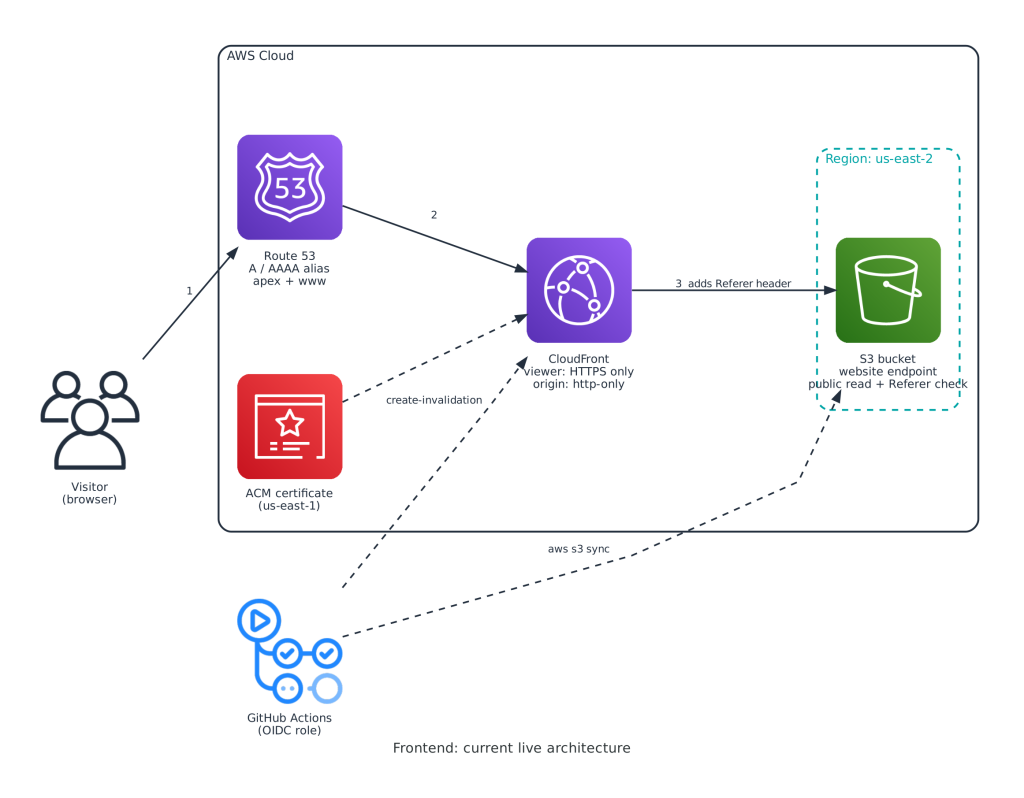
Worth knowing about how this is wired today: CloudFront talks to the bucket’s S3 website endpoint over HTTP, and the bucket policy allows reads based on a Referer header that CloudFront adds. It works, and it is how the site was built originally. It is also a legacy pattern, and a Referer header is not strong access control. I imported it as it is. Improving it is Part 2.
The CLI pager gotcha. A long get-distribution-config output stopped at a lone colon, because the CLI had opened it in less. Running aws configure set cli_pager “” fixed it for every future command too.
ACM clutter. There were three certificates for the same domain, two expired and unused. Only one is attached to CloudFront. I left the expired ones alone for now rather than guess.
The final plan. After 12 imports, the only difference was a tag. The distribution has a Name tag I had left out of my config, and its value starts with a leading space. I matched it exactly so the first plan stayed clean. Fixing the space is a separate change for later.
Mistakes along the way
Terraform is great at telling you what went wrong. It is less great at telling you it was you. Here is the full list:
| What I saw | What it actually was | The fix |
|---|---|---|
| NO_PUBKEY on apt update | Key piped into gpg, never saved | Download to a file, then gpg –dearmor |
| InvalidClientTokenId | Temporary ASIA credentials expired | Long-term key on a dedicated IAM user, clear any stale session token |
| Lambda needs a code source | Schema requires one even with ignore_changes | Placeholder zip plus ignore_changes |
| Variable domain_name not declared | I created the new .tf files in my home directory, not the project folder | Move the files into the project folder |
| Backend init: invalid bucket name | I pasted literal placeholder text into backend.hcl | Use the real bucket name, then init -reconfigure |
| Git push rejected (fetch first) | GitHub had auto-created a README | git pull –rebase, then push |
Publishing it without leaking things
The repo is public, so before the first push I set up a few guardrails:
- A .gitignore for state files, the .terraform/ folder, *.tfvars, and a local backend.hcl.
- Backend settings live in backend.hcl and get passed with terraform init -backend-config, so the committed backend block is empty.
- The ACM certificate ARN goes in terraform.tfvars, also ignored.
- A quick grep for account IDs and key prefixes before every commit.
State files deserve the most respect of the lot. They can contain sensitive values in plain text, which is why they live in a private, encrypted, versioned bucket and never in git.
That grep earned its keep. My bootstrap config still had my AWS account ID hardcoded in the bucket name. An account ID is not a secret the way a password or access key is: knowing it does not let anyone in. But it is still information I would rather not publish, and I redact it from screenshots, so the repo should follow the same rule. The fix was an aws_caller_identity data source, which produces the same bucket name without hardcoding anything, and the plan confirmed no change. The ID still exists in the first commit’s history. Since it is not a credential, I fixed forward instead of rewriting history.
For pushing from a server, I used an SSH deploy key scoped to this one repository, with an SSH config alias so the key is only used for that repo. That beats leaving a personal access token on a production box.
What I would tell anyone doing this
- Import first, improve second. Keep the imports boring.
- During the import phase, if a plan shows a difference, make your config match the live resource until the baseline is clean. Make intentional changes after that.
- Read the plan for the word “destroy” before every apply. Every time.
- Let the import question your assumptions. Mine surfaced three things I did not know were there.
- Use ignore_changes to keep Terraform and your deploy pipeline out of each other’s way.
- Treat the repo as public from the first commit.
Where this stands, honestly
This repo is a migration case study, not a reference architecture. Some of what it describes is legacy on purpose, because the goal was a clean baseline first:
- The S3 website endpoint, Referer header pattern and HTTP/1.1 CloudFront setting are imported as they were.
- The SAM template in the backend repo has not been brought in line with the live API (stage name, CORS settings and a few other properties differ), and the CloudFormation stack still tracks the same resources Terraform now manages. That overlap is the next thing I want to clean up, so it is not a good idea to edit those resources from both sides in the meantime.
- State locking still uses DynamoDB.
What’s next
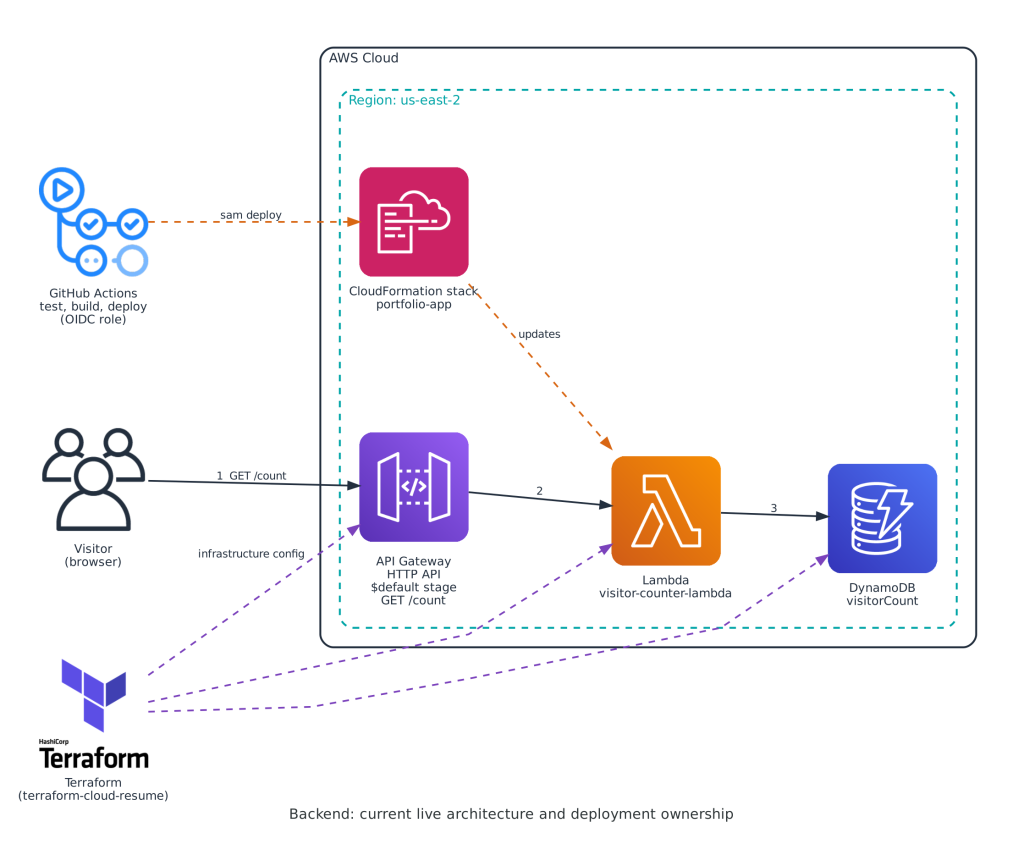
Part 2 is hardening, and none of it is done yet. This involves moving CloudFront to Origin Access Control with a private S3 origin, cleaning up the expired certificates, sorting out the SAM and Terraform overlap, and adding Terraform to my GitHub Actions pipeline so plans run on pull requests.
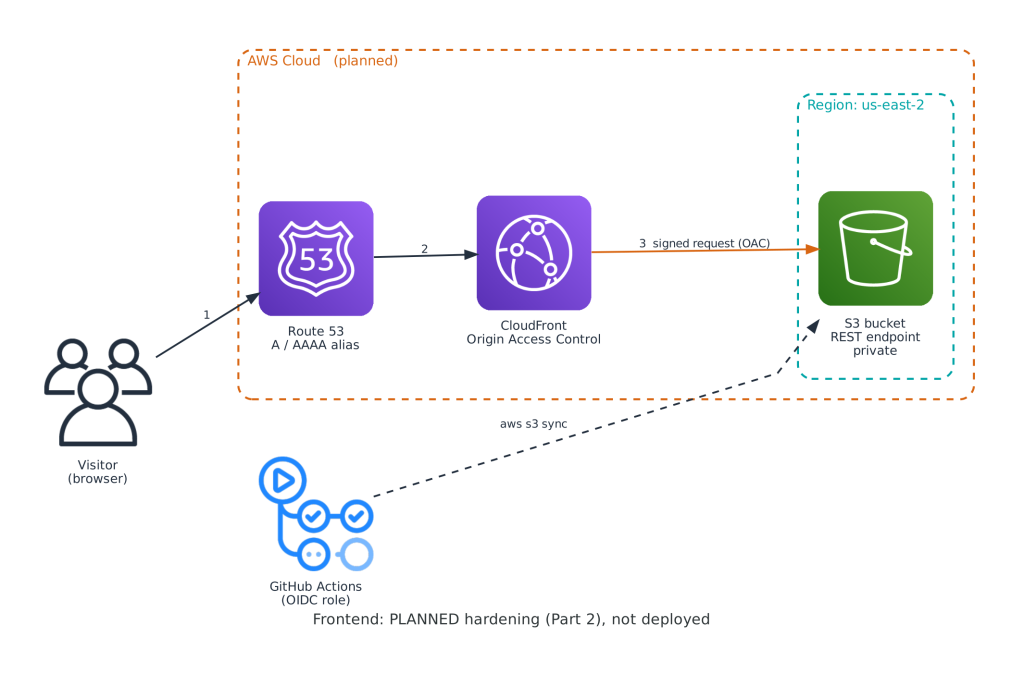
That diagram is the plan, not the current state. After that, it is on to Docker and Kubernetes for the rest of this series.
The code is on GitHub: github.com/RonMercier/terraform-cloud-resume
Want more hands-on cloud projects like this?
I share practical Linux, AWS, troubleshooting, cloud, and cybersecurity lessons every Tuesday, along with remote tech opportunities and career-focused resources.
Join the newsletter + get the free Linux Starter KitWant to inspect the code?
View the Terraform configuration, imports, state setup, and AWS infrastructure used in this project.
View the Terraform project on GitHub →